In this article
- The best cloud accounting software for small businesses: quick picks
- What is cloud accounting software?
- How cloud-based accounting software works
- Cloud vs desktop accounting software
- Benefits of cloud accounting software for small businesses
- 1. Your books are available anywhere
- 2. You see real-time numbers, not last month's
- 3. Less manual data entry
- 4. You and your accountant work in the same books
- 5. Updates, backups and security are handled for you
- 6. It grows with your business
- 7. Low upfront cost
- Key features to look for in cloud-based accounting software
- Which plans include the features that matter
- How we rated the best cloud accounting software
- Cloud accounting software compared at a glance
- The best cloud-based accounting software for small businesses in 2027
- 1. Tyms: best cloud accounting software if you want the bookkeeping done for you
- 2. Xero: best cloud-based accounting software for growing teams
- 3. Zoho Books: best free cloud accounting software
- 4. FreshBooks: best for freelancers and service businesses
- 5. Wave: best for one-person businesses on a budget
- 6. QuickBooks Online: best for accountant compatibility
- 7. Odoo: best all-in-one business suite
- Other cloud-based accounting software worth knowing
- How much does cloud accounting software cost?
- Hidden costs of cloud-based accounting software
- Is cloud-based accounting software safe?
- Can you get your data out if you leave?
- Can you use cloud accounting software offline?
- How to choose the right cloud accounting software for your business
- How to move to cloud-based accounting software
- Cloud accounting trends for 2027
- Our verdict
- References
- Common questions
Cloud accounting software, also called cloud-based accounting software, keeps your books online, so you can see your numbers from any device, your bank transactions flow in on their own and your accountant works in the same file as you. Most accounting software for small businesses is now cloud-based, and Intuit no longer even sells QuickBooks Desktop to new US subscribers. The hard part is choosing one, because the plans that look cheapest often leave out the features that save you time, such as bank feeds, reconciliation or extra users.
This guide covers everything you need to choose well. You'll learn what cloud accounting software is and how it works, what it does better than desktop software, which features matter and what each product really costs at your team size. We then review the best cloud-based accounting software for small businesses in 2027, using plans and list prices we checked on each vendor's own website in November 2026.
The best cloud accounting software for small businesses: quick picks
- Best overall if you want the bookkeeping done for you: Tyms. Its AI accountant, Adam, categorizes and reconciles your transactions, sends invoices and produces your financial statements, and you approve the work. $20 per seat a month, or $16.67 billed annually[1].
- Best for growing teams: Xero. No per-user fees on any plan, from $27 a month[2].
- Best free cloud-based accounting software: Zoho Books. Free for one user plus your accountant while revenue stays under $50K a year[3].
- Best for freelancers and service businesses: FreshBooks. Easy invoicing and time tracking, from $23 a month[4].
- Best for one-person businesses on a budget: Wave. Free Starter plan, with Pro at $19 a month[5].
- Best for accountant compatibility: QuickBooks Online. One of the most widely used options, from $38 a month[6].
- Best all-in-one business suite: Odoo. Accounting, inventory and CRM on one platform, with one app free[7].
Short on time? Decide what you want the software to do. If you want it to keep your books for you, choose Tyms. If you want a low bill and will do the bookkeeping yourself, choose Zoho Books, or Wave if you work alone. If several people need access, choose Xero, which never charges per user. If you mostly send invoices, choose FreshBooks.
What is cloud accounting software?
Cloud accounting software is accounting software that runs on the vendor's servers instead of on your computer. You log in through a web browser or a mobile app, pay a monthly or annual subscription, and the vendor handles hosting, updates, backups and security. Your general ledger, invoices, bills and reports live online, so anyone you give access to sees the same up-to-date numbers.
You'll also see it called cloud-based accounting software, online accounting software or SaaS accounting. They all mean the same thing.
How cloud-based accounting software works
- You connect your bank and card accounts. Most cloud-based accounting software uses a secure connection service, such as Plaid, to import your transactions every day.
- The software sorts the transactions. Rules, and in newer tools AI, suggest a category for each one and match payments to the invoices and bills they belong to.
- You create invoices, record bills and capture receipts, from your desk or your phone.
- The books update in real time. Your profit and loss, balance sheet and cash flow reports always reflect the latest data.
- Your accountant logs in to the same books to review, adjust and file taxes, so you don't email files back and forth.
Cloud vs desktop accounting software
| Cloud accounting software | Desktop accounting software | |
|---|---|---|
| Where it runs | The vendor's servers, through a browser or app | Installed on one computer or office server |
| Access | Any device, anywhere | The computer it's installed on, or remote desktop |
| Bank transactions | Import automatically through bank feeds | Usually downloaded and imported by hand |
| Updates | Automatic and included | Manual installs, often paid upgrades |
| Backups | Handled by the vendor | Your responsibility |
| Working with your accountant | Same live books, at the same time | Files sent back and forth |
| Cost | Monthly or annual subscription | Upfront license or subscription, plus hardware |
| Internet | Required | Not required for most tasks |
Desktop accounting is fading fast. Intuit stopped selling QuickBooks Desktop to new US subscribers in July 2024[8], and its new features, including AI agents, are going into QuickBooks Online[9]. If you're on a desktop product today, the real question is which cloud accounting software to move to and when.
Benefits of cloud accounting software for small businesses
1. Your books are available anywhere
Cloud-based accounting software works on any device with an internet connection. You can send an invoice from a job site, approve a bill from an airport or check cash on a Sunday night without going back to the office computer.
2. You see real-time numbers, not last month's
Because bank transactions import automatically, your reports stay current. You can make decisions about hiring, pricing or spending from today's cash position instead of waiting for a month-end close.
3. Less manual data entry
Bank feeds, bank rules and receipt capture replace most of the typing. The best cloud-based accounting software goes further and does the categorizing and reconciling for you.
4. You and your accountant work in the same books
There's no need to back up a file, send it over and wait for it to come back. Your accountant logs in with their own access, sees your live data and can fix issues before they become tax-time problems.
5. Updates, backups and security are handled for you
The vendor installs updates, patches security issues and backs up your data. You never pay for an upgrade or lose your books because a laptop died.
6. It grows with your business
You can add users, bank accounts, currencies, inventory or new apps as you grow, usually by changing your plan instead of changing software.
7. Low upfront cost
Instead of a large license fee and hardware, you pay a predictable subscription. Several products have free plans, and most paid plans for small businesses cost between $20 and $150 a month.
Key features to look for in cloud-based accounting software
Not every plan includes the same things, even from the same vendor. Check for these features before you sign up:
- Bank feeds and reconciliation. Automatic transaction imports are the single biggest time saver. Watch out: some entry plans leave them out. Wave's free Starter plan doesn't import bank transactions automatically[5], Zoho Books' free plan doesn't include bank feeds[3] and FreshBooks Lite doesn't include bank reconciliation[4].
- Invoicing and online payments. Branded invoices, recurring invoices, automatic reminders and card or bank payments.
- Expense and receipt capture. Snap a receipt on your phone or forward it by email and have it recorded.
- Financial reports. At a minimum a profit and loss, balance sheet and cash flow statement, plus aged receivables and payables.
- A mobile app. For invoicing, receipts and quick checks on the go.
- Users, roles and permissions. Control who can see payroll, approve payments or change bank details, and check what extra users cost.
- Integrations and an API. Connections to payroll, payments, e-commerce and CRM tools, and an open API so your data is never trapped.
- Multi-currency. Essential if you sell abroad or pay overseas contractors. It's often reserved for higher plans.
- Inventory. If you sell products, check for stock tracking and cost of goods sold.
- Payroll and tax. Usually a paid add-on. Check whether it's built in or through a partner.
- Automation and AI. Look past the marketing. Ask whether the software only suggests categories or actually does the reconciling, invoicing and reporting for you.
If you sell products, also read our guide to the best inventory management software, which compares how each tool gets stock and cost of goods sold into your books.
Which plans include the features that matter
| Software | Bank feeds and reconciliation | Mobile access | Multi-currency | Free trial or free plan |
|---|---|---|---|---|
| Tyms | Yes, through Plaid and Stripe; Adam reconciles for you | Point of sale app with barcode scanning, plus WhatsApp and email | Yes | Book a demo |
| QuickBooks Online | Yes | Free mobile app | Not listed on pricing page | 30-day free trial |
| Xero | Yes; automatic reconciliation on Growing and up, $5 add-on on Early | Tap to pay and receipt capture on iPhone and Android | Established plan only | Discount on first 3 months; no free trial listed |
| Zoho Books | Bank feeds from Standard; not on the Free plan | iOS and Android apps | From Professional | Free plan; 14-day trial of paid plans |
| FreshBooks | Bank reconciliation from Plus; not on Lite | iOS and Android apps | Not listed on pricing page | 30-day free trial, no card needed |
| Wave | Automatic bank imports on Pro only | Mobile invoicing app | Not listed on pricing page | Free Starter plan |
How we rated the best cloud accounting software
We reviewed each product's current plans, features and pricing pages in November 2026 and scored them out of 5 on five weighted criteria:
- Work it does for you (30%): bank feeds, reconciliation, automation and AI.
- Real cost for a small team (25%): list price for 1, 3, 5 and 10 users, billed monthly, without promotions.
- Core accounting depth (20%): reports, multi-currency, inventory and controls.
- Ease of use and access (15%): mobile access, setup effort and accountant access.
- Data safety and exit (10%): security controls, export options and API access.
| Software | Work done for you (30%) | Cost for a small team (25%) | Accounting depth (20%) | Ease of use (15%) | Data and exit (10%) | Overall |
|---|---|---|---|---|---|---|
| Tyms | 5.0 | 4.0 | 4.5 | 4.0 | 5.0 | 4.5 |
| Xero | 3.5 | 4.5 | 4.5 | 4.5 | 4.5 | 4.2 |
| Zoho Books | 3.0 | 5.0 | 4.0 | 3.5 | 4.0 | 3.9 |
| QuickBooks Online | 3.5 | 2.5 | 5.0 | 4.5 | 4.0 | 3.8 |
| Odoo | 3.0 | 4.0 | 4.5 | 2.5 | 4.0 | 3.6 |
| FreshBooks | 3.0 | 3.5 | 3.0 | 5.0 | 4.0 | 3.5 |
| Wave | 2.0 | 5.0 | 2.5 | 4.0 | 3.0 | 3.3 |
The reviews below are grouped by the kind of business each product suits best, not by score.
Tyms publishes this guide and is one of the products rated. We've tried to be fair: where another product is the better fit for a particular business, we say so.
Cloud accounting software compared at a glance
| Software | Best for | Starting price | Users | Watch out for |
|---|---|---|---|---|
| Tyms | Bookkeeping done for you by an AI accountant | $20 per seat a month | Pay per seat | Per-seat cost adds up for large teams |
| Xero | Growing teams that keep adding users | $27 a month (Early) | No per-user fees | Early plan limited to 20 invoices and 5 bills |
| Zoho Books | The lowest bill | Free under $50K revenue; paid from $20 a month | 1 to 15 by plan | Works best inside the Zoho ecosystem |
| FreshBooks | Freelancers and service businesses | $23 a month (Lite) | $11 a month per extra team member | Client limits on Lite and Plus |
| Wave | One-person businesses | Free; Pro $19 a month | Best for solo owners | Few features to grow into |
| QuickBooks Online | Accountant compatibility | $38 a month (Simple Start) | 1 to 25 by plan | User caps and the 2026 price increase |
| Odoo | Accounting, inventory and CRM in one suite | One app free; $11.20 per user a month (Standard) | Per user | Setup usually needs a partner |
The best cloud-based accounting software for small businesses in 2027
1. Tyms: best cloud accounting software if you want the bookkeeping done for you
Best for: small businesses and accounting firms that want accurate books without spending hours a week on them.
Most cloud accounting software gives you a place to do your bookkeeping. Tyms does the bookkeeping. Its AI accountant, Adam, works in your real double-entry ledger: it categorizes and reconciles bank transactions, creates and sends invoices, records bills and payments, and produces your trial balance, profit and loss, balance sheet and cash flow statement. You review and approve the work. Specialist agents can run on a schedule, so month-end tasks happen without anyone remembering to start them.
Pricing: $20 per seat a month, or $16.67 a month billed annually ($200 per seat a year). Each seat includes 1,500 transactions and 5 bank connections a month. A Done for you plan adds in-house experts who handle reconciliation, month-end close and tax filing[1].
Key features:
- Ask your books anything. Type "what did we spend on contractors last quarter?" and get an answer from your real data, or upload a receipt and have Adam record it. You can also work with Adam over WhatsApp or by email, or inside Claude, ChatGPT and Perplexity through Tyms MCP.
- US bank feeds through Plaid and Stripe Financial Connections, plus bulk statement upload. See how AI categorizes bank transactions.
- Teach it your rules. Give Adam instructions for banking, invoices, bills and contacts, and it follows them.
- Full accounting: multi-currency, inventory and manufacturing, fixed assets and depreciation, approvals and an audit log.
- US tax prep: maps your accounts to tax lines and generates a filled Schedule C.
Pros:
- Does the routine bookkeeping instead of just storing it.
- Cheaper than QuickBooks Online at every team size we priced.
- Syncs with QuickBooks Online and Zoho Books, so you can try it without moving your books.
- ISO 27001:2022 and SOC 2 Type 2 certified[1].
Cons:
- Newer than QuickBooks or Xero, so fewer outside accountants know it yet.
- Smaller native app marketplace than QuickBooks or Xero, although Zapier connects Tyms to almost any other tool, and an open API and webhooks cover custom needs.
- Per-seat pricing costs more than Xero or Zoho Books for larger teams that only need basic bookkeeping.
- Doesn't run US payroll itself, so you keep your payroll provider.
2. Xero: best cloud-based accounting software for growing teams
Best for: businesses with several people in the books, and owners whose accountant already uses Xero.
Xero's standout feature is its pricing model: there are no per-user fees on any plan[2]. A ten-person team pays the same as a two-person team. It integrates with more than 1,000 apps[2], and its $2.5 billion purchase of the US bill-pay company Melio in October 2025 shows it's investing heavily in the US[10].
Pricing: Early $27 a month, Growing $59 and Established $97. Payroll, powered by Gusto, is an add-on at $36 a month plus $6 per person[2].
Key features: bank reconciliation on all plans, invoicing and bills, tap-to-pay on iPhone and Android, receipt capture, and multi-currency on Established[2].
Pros:
- Unlimited users on every plan.
- Clean interface and a large app ecosystem.
- Widely used by accountants.
Cons:
- Early allows only 20 invoices and 5 bills, and charges $5 a month extra for automatic reconciliation[2].
- Multi-currency only comes with the $97 Established plan[2].
- You still build and maintain the rules that drive automation. See Tyms vs Xero.
3. Zoho Books: best free cloud accounting software
Best for: budget-conscious small businesses, especially those already using Zoho apps.
Zoho Books has one of the most generous free plans in cloud accounting software, and its paid plans stay cheap as you add people.
Pricing (billed monthly): Free for 1 user plus an accountant under $50K revenue. Standard $20 a month for 3 users, Professional $50 for 5, Premium $70 for 10, Elite $150 for 10 and Ultimate $275 for 15. Annual billing lowers each plan, for example Standard to $15. There's a 14-day free trial of paid plans[3].
Key features: bank feeds from Standard, multi-currency from Professional, and iOS and Android apps[3].
Pros:
- A real free plan, not just a trial.
- Low prices at every team size.
- Works well with the rest of the Zoho suite.
Cons:
- The free plan has no bank feeds[3].
- The interface is dense, and fewer US accountants use it daily.
- Automation depends on rules you set up yourself.
4. FreshBooks: best for freelancers and service businesses
Best for: consultants, agencies and service businesses whose main job in the software is billing clients.
FreshBooks has some of the friendliest invoicing and time tracking in cloud-based accounting software, and it's easy to learn if you've never used accounting software before.
Pricing: Lite $23 a month for up to 5 billable clients, Plus $43 for up to 50 and Premium $70 for unlimited clients. Each extra team member costs $11 a month. There's a 30-day free trial with no credit card[4].
Key features: invoicing, time tracking, mobile mileage tracking on every plan, and iOS and Android apps[4].
Pros:
- Very easy invoicing and client billing.
- Good mobile apps.
- Free trial without a credit card.
Cons:
- Lite has no bank reconciliation or double-entry accounting reports. You need Plus for both[4].
- Client limits and $11 per extra person add up as you grow.
- Inventory and deeper accounting are lighter than the other products here. See Tyms vs FreshBooks.
5. Wave: best for one-person businesses on a budget
Best for: sole proprietors and side businesses with simple books.
Pricing: Starter is free. Pro is $19 a month or $190 a year. Card payments on Starter cost 2.9% plus $0.60 per transaction[5].
Key features: unlimited invoices, estimates, bills and bookkeeping records on Starter, plus mobile invoicing. Pro adds automatic bank imports, transaction categorization, unlimited receipt capture and admin, editor and viewer access for other people[5].
Pros:
- Free invoicing and bookkeeping.
- A simple paid upgrade when you need bank imports.
Cons:
- The free plan doesn't import bank transactions automatically, and receipt capture is a paid add-on there[5].
- Not every bank connects through Plaid, Wave's bank connection provider[5].
- Little room to grow into inventory, multiple currencies or approvals.
6. QuickBooks Online: best for accountant compatibility
Best for: businesses whose accountant or industry runs on QuickBooks.
QuickBooks Online is one of the most widely used cloud-based accounting software products in the US, with a huge network of apps and trained bookkeepers.
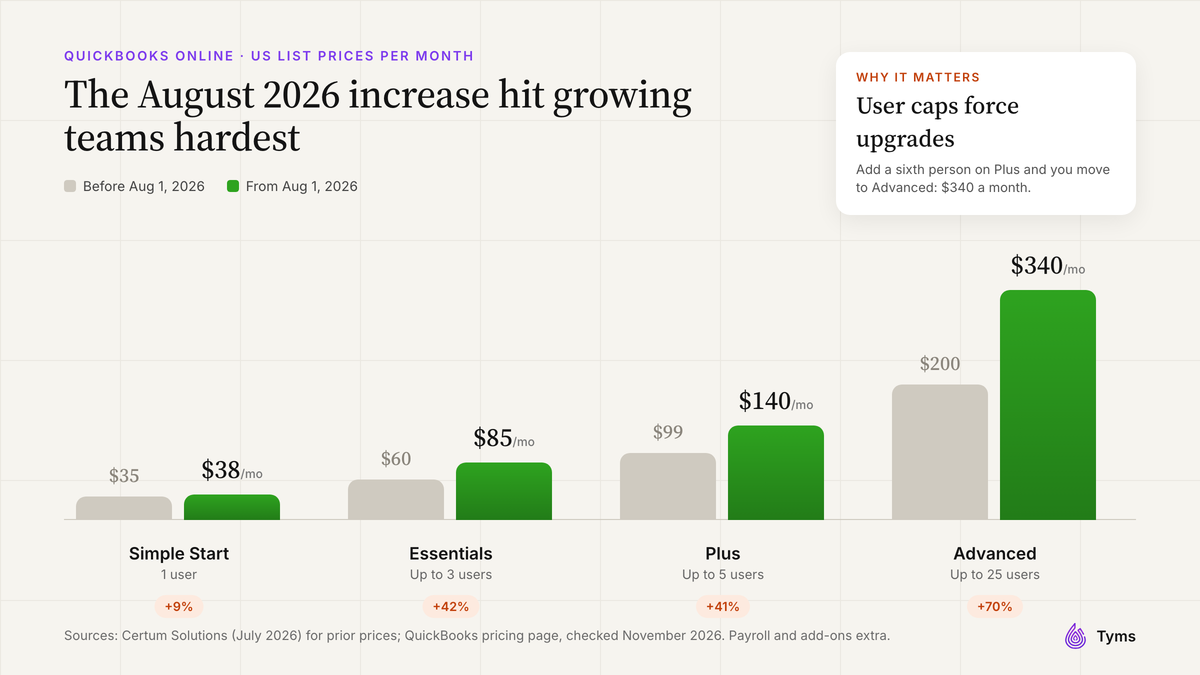
Pricing: Simple Start $38 a month for 1 user, Essentials $85 for up to 3, Plus $140 for up to 5 and Advanced $340 for up to 25. Payroll is extra. There's a 30-day free trial[6].
Key features: a free mobile app, inventory and project profitability on Plus and Advanced[6], plus a large integration marketplace.
Pros:
- Widely known by US accountants and bookkeepers.
- Deep features and a huge app ecosystem.
- New AI agents are being added[9].
Cons:
- The most expensive option at nearly every team size we priced.
- User caps force an upgrade as you hire.
- Prices rose on August 1, 2026, with Plus going from $99 to $140 a month[11]. If price is why you're looking, see the best QuickBooks alternatives.
7. Odoo: best all-in-one business suite
Best for: businesses that want accounting, inventory, sales and CRM on one platform.
Pricing: one app is free with unlimited users. The Standard plan with all apps is $11.20 per user a month, with a lower introductory rate for the first year[7].
Pros:
- Huge range of business apps on one platform.
- Low per-user price.
Cons:
- Much more setup than the others, often with a paid partner.
- Per-user pricing grows with your team.
Other cloud-based accounting software worth knowing
- Sage Accounting: a long-standing option for small businesses in the US, UK and Canada. Check current US prices on Sage's website, because its plans and offers change often.
- Oracle NetSuite and Sage Intacct: cloud ERP and finance systems for mid-sized companies with several entities. Both are quote-only.
- Microsoft Dynamics 365 Business Central: for companies standardized on Microsoft, from $80 per user a month[12].
Most small businesses won't need an ERP for years. If you're unsure, start with small business cloud-based accounting software and move up when you add entities or a finance team.
How much does cloud accounting software cost?
Most small businesses pay between $0 and $150 a month for cloud-based accounting software. The headline price only tells you what one person pays, though. Here's the monthly list price for teams of different sizes, using the cheapest plan that fits each team.
| Team size | Tyms | QuickBooks Online | Xero | Zoho Books | FreshBooks |
|---|---|---|---|---|---|
| 1 person | $20 | $38 (Simple Start) | $59 (Growing) | $0 under $50K revenue, else $20 | $43 (Plus) |
| 3 people | $60 | $85 (Essentials) | $59 (Growing) | $20 (Standard) | $65 (Plus + 2) |
| 5 people | $100 | $140 (Plus) | $59 (Growing) | $50 (Professional) | $87 (Plus + 4) |
| 10 people | $200 | $340 (Advanced) | $59 (Growing) | $70 (Premium) | $142 (Plus + 9) |
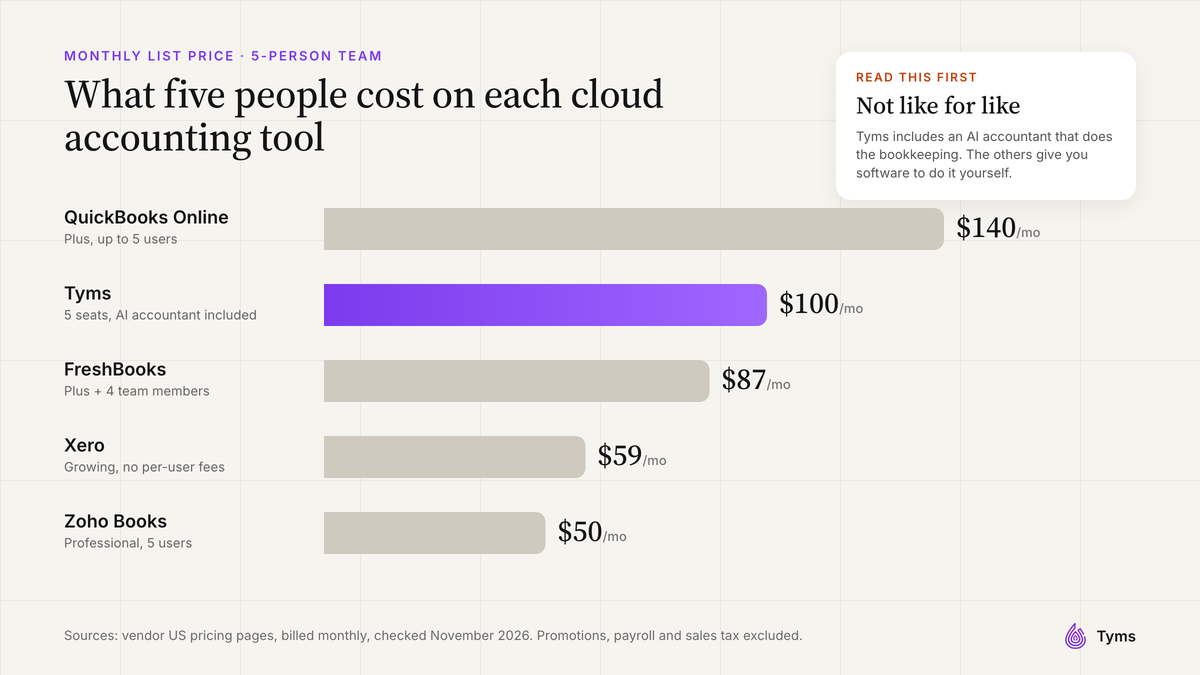
What the table shows:
- Xero and Zoho Books are the cheapest for bigger teams because they don't charge, or barely charge, per person.
- QuickBooks Online is the most expensive at almost every size, and its user caps mean the next hire can trigger a new plan.
- Tyms costs more than Xero or Zoho Books for five people, but it's a different kind of product. You're paying for software that does the bookkeeping, not just a place to record it. If it saves a few hours of bookkeeper time a month, it pays for itself.
Hidden costs of cloud-based accounting software
- Payroll is usually extra, for example Xero's Gusto-powered payroll at $36 a month plus $6 per person[2].
- Payment processing fees, such as Wave's 2.9% plus $0.60 per card payment on its free plan[5].
- Feature add-ons, such as Xero's $5 a month automatic reconciliation on Early[2] or Wave's paid receipt capture on Starter[5].
- Extra users, such as FreshBooks' $11 a month per team member[4].
- Price rises at renewal. QuickBooks Online raised its list prices on August 1, 2026[11].
Is cloud-based accounting software safe?
Yes, if you choose a reputable vendor and use the controls it gives you. A well-run cloud platform is usually safer than books on a single laptop that can be stolen, broken or hit by ransomware. Before you sign up, check for:
- Independent security certifications such as SOC 2 or ISO 27001.
- Two-factor authentication, so a stolen password alone can't open your books.
- Roles and permissions, so someone who enters bills can't approve payments or change bank details.
- An audit log that shows who changed what and when.
- Approval workflows for payments and large transactions.
- Read-only bank connections through an established provider such as Plaid, so the accounting software doesn't hold your bank login.
Tyms is ISO 27001:2022 and SOC 2 Type 2 certified[1] and includes two-factor authentication, custom roles for each module, a full audit log and rule-based approvals.
Can you get your data out if you leave?
In December 2024, the online bookkeeping service Bench shut down with almost no warning, just ahead of tax season, leaving customers scrambling for their records[13]. They were later offered a path to a new owner, Employer.com[14]. Protect yourself by choosing cloud-based accounting software that lets you export your general ledger, contacts, invoices and attachments to CSV or Excel, and offers an open API. Keep your own monthly backup of the trial balance and general ledger. Tyms supports spreadsheet exports and a REST API covering transactions, contacts and financial statements.
Can you use cloud accounting software offline?
Not fully. Cloud accounting software needs an internet connection to sync with your bank and update your books. Some mobile apps let you draft invoices or capture receipts and sync them when you're back online, but if your internet is unreliable, check how each product's mobile app handles this before you commit.
How to choose the right cloud accounting software for your business
- Freelancer or one-person business: start with Wave or Zoho Books' free plan. Choose Wave Pro or Zoho Standard once you want bank feeds.
- Service business that invoices a lot: FreshBooks Plus or higher, so you get bank reconciliation and proper accounting reports.
- Growing team: Xero, because it never charges per user, or Tyms if you'd rather not hire extra bookkeeping help.
- Business that sells products: a plan with inventory, such as QuickBooks Online Plus, Zoho Books, Odoo or Tyms.
- Selling or paying in several currencies: Zoho Books Professional, Xero Established or Tyms.
- Too busy to do the bookkeeping: Tyms, so Adam does the routine work and you approve it.
- Accounting or bookkeeping firm: software that manages every client from one place. Tyms includes a white-label client portal on your own domain, seat pools you can assign to clients and client billing through Stripe. See the best accounting software for CPA firms.
Whatever you choose, take the free trial or demo with your real bank feed connected, and reconcile one real month before you commit.
How to move to cloud-based accounting software
- Pick a cutover date, ideally the start of a month or quarter.
- Export your data: chart of accounts, opening balances, contacts, open invoices and bills, and at least a year of transactions.
- Use a migration service if one is offered. Tyms works with a conversion partner, MMC Convert, that moves books from QuickBooks, Xero, Zoho Books and Sage, with most files ready in 3 to 4 working days[15]. See the migration page.
- Run both systems for a month and compare the trial balance and bank balances. Tyms can sync with QuickBooks Online and Zoho Books, so you don't enter anything twice.
- Connect bank feeds, invite your accountant and switch off the old system once the numbers match.
Cloud accounting trends for 2027
- AI that does the work, not just suggests it. Intuit has launched AI agents for QuickBooks[9], and AI-native tools like Tyms are built around an AI accountant. The practical test is simple: after a month, how many hours did it save you?
- Payments built into accounting. Xero's purchase of Melio shows accounting and bill pay merging into one product[10].
- The end of desktop. With QuickBooks Desktop closed to new US subscribers[8], cloud-based accounting software is now the default.
- Your books inside your AI assistant. Tools like Tyms MCP let you work with your accounts from Claude, ChatGPT and Perplexity.
- More attention to vendor risk. After Bench's shutdown[13], buyers are asking about data export and APIs before they sign.
Our verdict
There's no single best cloud accounting software for every small business, but there's a clear best fit for each situation:
- Want the books done for you, not just stored online? Choose Tyms.
- Growing team that's tired of per-user fees? Choose Xero.
- Want the lowest bill? Choose Zoho Books, or Wave if you work alone.
- Mostly invoicing clients? Choose FreshBooks Plus.
- Your accountant won't use anything else? Stay on QuickBooks Online and consider adding Tyms on top to cut the manual work.
If you spend more time on your books than on your business, see Tyms pricing or try our free accounting tools first.
References
- Tyms pricing Tyms, 2026
- Xero US pricing plans Xero, 2026
- Zoho Books pricing (United States) Zoho, 2026
- FreshBooks pricing FreshBooks, 2026
- Wave pricing Wave Financial, 2026
- QuickBooks Online plans and pricing Intuit, 2026
- Odoo pricing Odoo, 2026
- Can't buy QuickBooks Desktop as a new US subscriber Intuit, 2024
- Intuit introduces ground-breaking virtual team of AI agents to fuel growth for businesses Intuit, 2025
- Xero Completes Acquisition of Payments Platform Melio for $2.5B CPA Practice Advisor, 2025
- QuickBooks Online Is Raising Prices August 1: Plan Costs & What to Do Certum Solutions, 2026
- Dynamics 365 Business Central pricing Microsoft, 2026
- Bench Accounting abruptly shuts down ahead of tax season Techcouver, 2024
- Bench Accounting to be acquired by Employer.com following abrupt shutdown GeekWire, 2024
- Migrate to Tyms Tyms, 2026
Common questions
Cloud accounting software is accounting software that runs on the vendor's servers instead of your computer. You use it through a web browser or mobile app, pay a subscription, and the vendor handles updates, backups and security. Bank transactions import automatically, and you, your team and your accountant work in the same live books.
It depends on what you need most. Tyms is the best fit if you want an AI accountant to do the bookkeeping for you. Xero suits growing teams because it has no per-user fees, Zoho Books and Wave are the cheapest, FreshBooks is best for service businesses that mostly invoice, and QuickBooks Online is the safe choice if your accountant insists on it.
Desktop software is installed on one computer, so your data lives in a file you have to back up and share. Cloud accounting software runs online, updates automatically, connects to your bank and lets several people work in the same books at once. Intuit stopped selling QuickBooks Desktop to new US subscribers in July 2024.
Yes, with a reputable vendor and the right settings. Look for independent certifications such as SOC 2 or ISO 27001, two-factor authentication, roles and permissions, an audit log, approval workflows and read-only bank connections through a provider such as Plaid.
Most small businesses pay between $0 and $150 a month. In November 2026, US list prices started at $0 for Wave and Zoho Books' free plans, $20 per seat for Tyms, $23 for FreshBooks, $27 for Xero and $38 for QuickBooks Online. Team size changes the total a lot, because some products charge per user and others don't.
Yes. Wave's Starter plan is free, and Zoho Books is free for one user plus an accountant while revenue stays under $50K a year. Free plans have limits: Wave Starter doesn't import bank transactions automatically, and Zoho's free plan doesn't include bank feeds.
Yes. QuickBooks Online, Zoho Books and FreshBooks have iOS and Android apps, Xero supports tap to pay and receipt capture on iPhone and Android, and Wave has a mobile invoicing app. With Tyms you can also work with Adam over WhatsApp or by email.
Not fully. Cloud accounting software needs an internet connection to sync with your bank and update your books. Some mobile apps let you draft invoices or capture receipts and sync them later, so check how each app handles this if your connection is unreliable.
Yes. Most connect to payroll, payments, e-commerce, CRM and banking apps. Xero lists more than 1,000 app integrations. Look for an open API as well, so you can connect custom tools and move your data if you ever leave.
Many products do, but often only on higher plans. Zoho Books includes multi-currency from its Professional plan, Xero only on Established, and Tyms includes it as standard. Check before you sign up if you sell abroad or pay overseas contractors.
Yes. You invite your accountant as a user with their own login and permissions, and they see the same live books you do. Zoho Books' free plan even includes a seat for your accountant.
With most products, yes, because the software stores the work but someone still has to categorize, reconcile and close the books. AI-native cloud accounting software such as Tyms does much of that routine work itself and asks you to approve it, so you need far fewer bookkeeping hours.