In this article
- The best inventory management software for small businesses: quick picks
- What is inventory management software?
- How inventory management software works
- Spreadsheets vs inventory management software: when to switch
- Inventory management software vs warehouse management systems vs ERP
- The four types of inventory, and perpetual vs periodic tracking
- Why your inventory belongs in your books
- Your costing method changes your reported profit
- Benefits of inventory management software
- 1. Fewer stockouts and lost sales
- 2. Less cash tied up in slow-moving stock
- 3. Real profit by product
- 4. Faster, cleaner month-end
- 5. Less manual counting and data entry
- 6. Better purchasing decisions
- 7. Control and accountability
- Key features to look for in inventory management software
- Which tools include the features that matter
- Inventory formulas every small business should know
- Reorder point
- Safety stock
- Economic order quantity (EOQ)
- Inventory turnover and days inventory outstanding
- Sell-through rate
- How we rated the best inventory management software
- Inventory management software compared at a glance
- The best inventory management software for small businesses in 2027
- 1. Tyms: best inventory management software with accounting built in
- 2. Zoho Inventory: best all-round inventory software for online sellers
- 3. inFlow Inventory: best for wholesale and B2B
- 4. Katana: best for small manufacturers
- 5. Sortly: best simple inventory tracking app
- 6. Cin7 Core: best for multichannel brands
- 7. Fishbowl: best if you're staying on QuickBooks or Xero
- 8. Odoo Inventory: best open, all-in-one suite
- Other inventory software worth knowing
- How much does inventory management software cost?
- Hidden costs of inventory software
- How to choose the right inventory management software for your business
- How to set up an inventory management system
- Inventory management best practices
- Inventory management system trends for 2027
- Our verdict
- References
- Common questions
Inventory management software tells you what you have, where it is, what it cost and when to buy more. Get it right and you stop losing sales to stockouts, stop tying up cash in products that don't sell, and finally know your real profit on every item. Get it wrong, or run it from a spreadsheet, and the numbers in your stockroom and the numbers in your books slowly drift apart.
This guide explains how inventory management software works, which features matter for your type of business, the formulas you need to plan stock, and what each product really costs. We then compare the best inventory management software for small businesses in 2027, using plans and prices we checked on each vendor's own website in November 2026. Unlike most lists, we also show how each tool handles the part that decides your profit: getting inventory into your accounts.
The best inventory management software for small businesses: quick picks
- Best if you want inventory and accounting in one place: Tyms. Stock, purchasing, production, a point of sale app with barcode scanning and your full books share one ledger, and its AI accountant, Adam, records sales, restocks and production for you. $20 per seat a month[1].
- Best all-round inventory software for online sellers: Zoho Inventory. A free plan for 50 orders a month and paid plans that add warehouses, serial and batch tracking[2].
- Best for wholesale and B2B distributors: inFlow Inventory. From $129 a month billed monthly, with unlimited sales orders[3].
- Best for small manufacturers: Katana. A free plan for up to 30 SKUs with unlimited users[4].
- Best simple inventory tracking app: Sortly. Free for 100 items, with mobile barcode and QR scanning[5].
- Best for multichannel brands: Cin7 Core. From $349 a month for 5 users[6].
- Best if you're staying on QuickBooks or Xero: Fishbowl. From $229 a month billed annually, with QuickBooks Online and Xero sync[7].
- Best open, all-in-one suite: Odoo. One app free with unlimited users[8].
Short on time? Start with how you sell. If you sell online across several channels, look at Zoho Inventory or Cin7. If you make products, look at Katana. If you sell wholesale, look at inFlow. If you only need to count and locate things, Sortly is enough. If you want stock, cost of goods sold and profit to land in your books automatically, choose Tyms.
What is inventory management software?
Inventory management software is a program that records every item you buy, make, store and sell, and keeps a live count of your stock. It tracks quantities, costs and movements, from purchase orders and deliveries to sales, returns and write-offs, so you always know what's on hand, what it's worth and when to reorder.
People search for it under many names: inventory programs, inventory management programs, inventory tracking software, inventory tracking programs, stock management software, inventory keeping software, an inventory monitoring system or simply an inventory management system. Inventory planning software is a closely related category focused on forecasting demand and deciding what to buy. Most modern inventory management software covers tracking and basic planning in one place.
How inventory management software works
- You set up your items. Each product gets a SKU, a unit of measure, a cost and, if you make things, a bill of materials listing its components.
- Stock comes in. You raise purchase orders, receive deliveries and the software adds the quantities and costs to your stock.
- Stock goes out. Sales, from your store, website or invoices, reduce stock as they happen. That's called perpetual inventory tracking.
- The software values what's left. It applies a costing method such as FIFO or weighted average cost to work out the cost of goods sold and the value of the stock you still hold.
- It tells you what to do next. Stock levels, reorder points and reports show what's running low, what's not selling and which items make you money.
Spreadsheets vs inventory management software: when to switch
A spreadsheet is fine when you have a few dozen items, one location and one sales channel. It stops working when:
- You sell in more than one place, such as a store and a website, and the counts never match.
- You run out of best-sellers or keep reordering slow movers because nobody can see real-time stock.
- Your accountant can't reconcile inventory with your books at month end.
- More than one person updates stock, and you can't tell who changed what.
- You make products from components and need to know what you can build from what's on the shelf.
If two or more of these sound familiar, an inventory management system will pay for itself quickly.
Inventory management software vs warehouse management systems vs ERP
| Inventory management software | Warehouse management system (WMS) | ERP | |
|---|---|---|---|
| Main job | Track stock, purchases, sales and inventory value | Run warehouse operations: bins, picking, packing and shipping | Run the whole company: finance, inventory, manufacturing and CRM |
| Best for | Small and growing product businesses | High-volume warehouses | Mid-sized and multi-entity companies |
| Typical setup time | Days to weeks | Weeks to months | Months |
| Accounting | Built in or synced | Usually none | Built in |
Most small businesses need an inventory management system, ideally connected to or inside their accounting software. A warehouse management system (WMS) only makes sense once you run a large warehouse with pick paths, bins and many staff. An ERP such as NetSuite suits mid-sized companies that need finance, inventory, manufacturing and CRM across several entities.
The four types of inventory, and perpetual vs periodic tracking
Inventory falls into four broad types:
- Raw materials: components you buy to make products.
- Work in progress (WIP): items that are partly made.
- Finished goods: products ready to sell.
- MRO supplies: maintenance, repair and operating items you use but don't sell.
There are also two ways to track it. Perpetual inventory updates stock and cost with every sale and purchase, which is what an inventory management system does. Periodic inventory only updates after a physical count, usually at month or year end, so you're guessing in between.
Why your inventory belongs in your books
This is the part most inventory software guides skip, and it's the part that decides your profit.
Inventory is an asset on your balance sheet. When you sell an item, its cost moves out of inventory and into cost of goods sold (COGS) on your profit and loss statement. If your inventory software and your accounting software disagree, both your profit and your balance sheet are wrong, and you won't find out until your accountant tries to close the year.
When inventory lives in one app and the books in another, small businesses usually run into three problems:
- Sync errors. An integration misses a sale, double-counts a restock or posts at the wrong cost.
- Profit you can't trust. If COGS is estimated instead of calculated, your gross margin by product is a guess.
- Month-end cleanup. Someone has to reconcile the stock report with the balance sheet by hand.
Your costing method changes your reported profit
The method you use to value inventory changes your COGS, your profit and the value of your remaining stock. Here's the same set of purchases under the three common methods.
Say you buy 100 units at $10 in January and 100 units at $12 in February, then sell 120 units at $20 each, for $2,400 of revenue.
| Costing method | Cost of goods sold (120 units) | Gross profit | Ending inventory (80 units) |
|---|---|---|---|
| FIFO | $1,240 | $1,160 | $960 |
| LIFO | $1,400 | $1,000 | $800 |
| Weighted average cost | $1,320 | $1,080 | $880 |
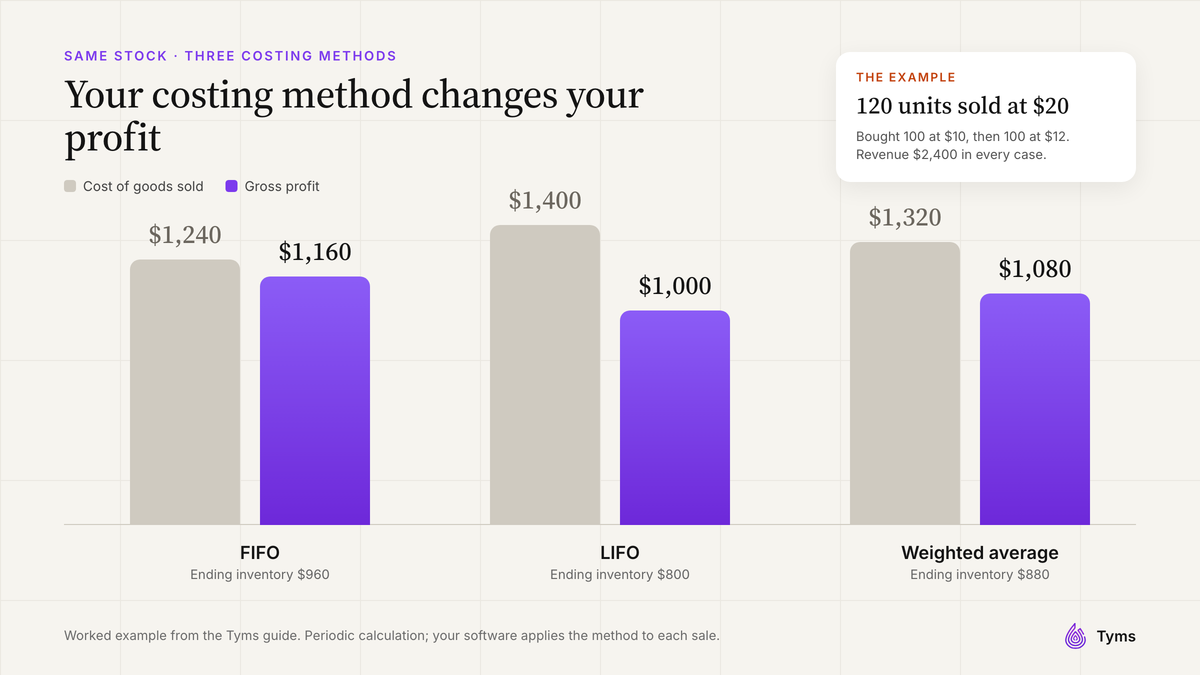
- FIFO (first in, first out) assumes you sell the oldest stock first. When costs are rising, it gives the lowest COGS and the highest profit.
- LIFO (last in, first out) assumes you sell the newest stock first. When costs are rising, it gives higher COGS and lower taxable profit. It isn't allowed in many countries outside the US, so check with your accountant.
- Weighted average cost (WAC) uses the average cost of all units, which smooths out price swings.
A good inventory management system applies your chosen method automatically on every sale, so COGS and gross margin are calculated, not estimated. Tyms supports FIFO, LIFO and weighted average cost and posts the entries to your ledger as you sell. To try the math on your own numbers, use our free inventory valuation calculator.
Benefits of inventory management software
1. Fewer stockouts and lost sales
Live stock levels and reorder points warn you before a best-seller runs out, instead of after a customer leaves empty-handed.
2. Less cash tied up in slow-moving stock
Reports on turnover and aging show which products sit on the shelf, so you can stop reordering them and free up cash.
3. Real profit by product
When the software calculates COGS on every sale, you can see gross margin by item, customer and channel, and price with confidence.
4. Faster, cleaner month-end
Stock, purchases and COGS flow into your accounts, so your balance sheet inventory matches what's on the shelf without a manual reconciliation.
5. Less manual counting and data entry
Barcode scanning, purchase orders that turn into stock receipts and sales that update stock automatically replace most of the typing.
6. Better purchasing decisions
Purchase history, supplier lead times and sales velocity show what to buy, how much and when.
7. Control and accountability
User roles, approvals and an audit trail show who adjusted stock and why, which cuts errors and theft.
Key features to look for in inventory management software
- Real-time inventory tracking across every location and sales channel.
- Purchase orders and receiving, ideally with approvals, that update stock and supplier bills.
- Reorder points and low-stock visibility, so you know what to buy before you run out.
- Inventory costing and valuation with FIFO, LIFO or weighted average cost, plus COGS and inventory valuation reports.
- Accounting connection. Either built-in accounting or a reliable two-way sync, so COGS and inventory value reach your books.
- Barcode and mobile scanning for receiving, picking and stock counts.
- Multi-location and warehouse support if you hold stock in more than one place.
- Serial and batch tracking for products with warranties, recalls or expiry dates.
- Bills of materials and production orders if you assemble or manufacture products.
- Sales channel integrations with your POS and e-commerce platforms.
- Reporting: stock on hand, aging, turnover, sell-through and profitability by item.
- Automation and AI that records transactions, reads documents and flags issues.
Which tools include the features that matter
| Software | Accounting | Barcode scanning | Manufacturing | Free plan or trial |
|---|---|---|---|---|
| Tyms | Built in (full double-entry) | Scan and generate barcodes; point of sale app for your team | Composite items and production orders | Book a demo |
| Zoho Inventory | Separate app (Zoho Books) | Barcode generation on Premium | Composite items on every plan | Free plan (50 orders a month); 14-day trial |
| inFlow Inventory | Separate app | Stockroom scanning app ($39 add-on) | Separate inFlow Manufacturing product | 14-day trial, no card |
| Katana | Separate app | Not listed | Core focus | Free plan (30 SKUs) |
| Sortly | Not included | In-app barcode and QR scanning | No | Free plan (100 items); 14-day trial |
| Cin7 Core | Separate app | Not listed | Not listed | Free trial offered |
| Fishbowl | QuickBooks Online and Xero sync | Not listed | Advanced Manufacturing plan | Not listed |
Inventory formulas every small business should know
Inventory software runs these calculations for you, but knowing them helps you set the right reorder points and spot problems. The examples use one product that sells 15 units a day.
Reorder point
Reorder point = (average daily sales × lead time in days) + safety stock
If you sell 15 units a day, your supplier takes 10 days to deliver and you keep 90 units of safety stock, your reorder point is (15 × 10) + 90 = 240 units. When stock falls to 240, reorder.
Safety stock
Safety stock = (maximum daily sales × maximum lead time) − (average daily sales × average lead time)
If your busiest days reach 20 units and your slowest delivery takes 12 days: (20 × 12) − (15 × 10) = 240 − 150 = 90 units.
Economic order quantity (EOQ)
EOQ = √(2 × annual demand × cost per order ÷ annual holding cost per unit)
With annual demand of 5,400 units, $50 to place an order and $2 a year to hold each unit: √(2 × 5,400 × 50 ÷ 2) = √270,000 ≈ 520 units per order.
Inventory turnover and days inventory outstanding
Inventory turnover = cost of goods sold ÷ average inventory value
With $240,000 of COGS a year and $40,000 of average inventory, turnover is 6 times a year. Days inventory outstanding = 365 ÷ turnover, so 365 ÷ 6 ≈ 61 days: on average, stock sits for about two months before it sells.
Sell-through rate
Sell-through rate = units sold ÷ units received × 100
If you received 400 units this season and sold 340, your sell-through is 85%. A low sell-through tells you to order less next time or mark the item down.
| Metric | Formula | Example |
|---|---|---|
| Reorder point | (Average daily sales × lead time) + safety stock | (15 × 10) + 90 = 240 units |
| Safety stock | (Max daily sales × max lead time) − (avg daily sales × avg lead time) | (20 × 12) − (15 × 10) = 90 units |
| Economic order quantity | √(2 × annual demand × order cost ÷ holding cost per unit) | √(2 × 5,400 × 50 ÷ 2) ≈ 520 units |
| Inventory turnover | COGS ÷ average inventory | $240,000 ÷ $40,000 = 6 times a year |
| Days inventory outstanding | 365 ÷ inventory turnover | 365 ÷ 6 ≈ 61 days |
| Sell-through rate | Units sold ÷ units received × 100 | 340 ÷ 400 = 85% |
How we rated the best inventory management software
We reviewed each product's current plans, features and pricing pages in November 2026 and scored them out of 5 on five weighted criteria:
- Inventory depth (30%): tracking, purchasing, locations, serial and batch, and manufacturing.
- Connection to your books (25%): costing methods, COGS and how reliably inventory reaches your accounts.
- Real cost for a small team (20%): list price for 2 and 5 users, plus required add-ons and onboarding.
- Ease of use (15%): setup effort, mobile access and scanning.
- Automation and AI (10%): how much routine recording the software does for you.
| Software | Inventory depth (30%) | Connection to your books (25%) | Cost for a small team (20%) | Ease of use (15%) | Automation and AI (10%) | Overall |
|---|---|---|---|---|---|---|
| Tyms | 4.5 | 5.0 | 4.5 | 4.5 | 5.0 | 4.7 |
| Zoho Inventory | 4.5 | 3.5 | 4.5 | 4.0 | 3.0 | 4.0 |
| Cin7 Core | 5.0 | 3.5 | 2.5 | 3.5 | 3.5 | 3.8 |
| Odoo | 4.5 | 4.0 | 4.0 | 2.5 | 3.0 | 3.8 |
| Katana | 4.5 | 3.0 | 3.5 | 4.0 | 3.0 | 3.7 |
| inFlow Inventory | 4.5 | 3.0 | 2.5 | 4.0 | 3.0 | 3.5 |
| Fishbowl | 4.5 | 3.5 | 2.5 | 3.0 | 2.5 | 3.4 |
| Sortly | 3.0 | 1.5 | 4.5 | 5.0 | 2.5 | 3.2 |
The reviews below are grouped by the kind of business each product suits best, not by score. Tyms publishes this guide and is one of the products rated. Where another product is the better fit, we say so.
Inventory management software compared at a glance
| Software | Best for | Starting price | Users | Watch out for |
|---|---|---|---|---|
| Tyms | Inventory, POS and accounting in one system | $20 per seat a month | Per seat | No warehouse bins or shipping labels |
| Zoho Inventory | Online and multichannel sellers | Free plan (50 orders a month) | 1 to 7 by plan | User and location caps |
| inFlow Inventory | Wholesale and B2B | $129 a month (Lite, billed monthly) | 2 to 20 by plan | $499 onboarding on most plans |
| Katana | Small manufacturers | Free (30 SKUs); Advantage custom | Unlimited | No published paid price |
| Sortly | Simple item tracking | Free (100 items) | 1 to 12+ by plan | Item caps on each plan |
| Cin7 Core | Multichannel brands | $349 a month | 5 to 15 by plan | High starting price |
| Fishbowl | QuickBooks and Xero users | $229 a month, billed annually | 2 to 10 by plan | Annual billing; final price quoted |
| Odoo | All-in-one business suite | One app free; $11.20 per user (Standard) | Per user | Complex setup |
The best inventory management software for small businesses in 2027
1. Tyms: best inventory management software with accounting built in
Best for: small businesses, retailers, wholesalers and small manufacturers that want stock, purchasing, production and accounting in one system, with AI doing the recording.
Most inventory programs sit next to your accounting software and sync to it. Tyms Inventory and Manufacturing puts inventory inside a full double-entry accounting system, so every sale, restock and production run updates stock and your books at the same time. There's nothing to sync and nothing to reconcile.
Pricing: $20 per seat a month, or $16.67 a month billed annually. Each seat includes 1,500 transactions and 5 bank connections a month[1].
Key inventory features:
- Inventory and non-inventory items with SKUs, categories, images and opening stock.
- Barcode scanning and barcode generation. Generate barcodes for your items and scan them to find, sell and count stock.
- A point of sale app for your team. Give staff access to scan and sell at the counter, and every sale updates stock, cost of goods sold and your books at the same time.
- Selling and restocking one item or many at once. Tyms warns you, or blocks the sale, when an item doesn't have enough stock.
- Purchase orders with approvals that convert into restock bills when the goods arrive.
- Composite items and production orders. Define the raw materials for each product, see the maximum you can produce from current stock, and move each production run through work in progress to finished goods, with the accounting entries posted at every step.
- Costing methods: FIFO, LIFO or weighted average cost, with inventory, raw materials, work in progress, finished goods and COGS accounts.
- Inventory adjustments by branch, locked once saved and recorded in the audit log.
- Reports: inventory valuation, cost of goods sold by item, inventory purchases, and a statement and analytics for each item, alongside sales and profit by item, customer and branch.
- An AI Inventory agent. Adam can create items, record sales and restocks, run production orders and read item details from images and documents, on demand or on a schedule.
- Integrations through Zapier. Connect Tyms to the e-commerce, CRM, payment and productivity tools you already use, plus an open API and webhooks for custom connections.
Pros:
- Inventory, COGS and financial statements always agree, because they share one ledger.
- Covers purchasing and light manufacturing as well as stock.
- AI records the routine transactions, so you review instead of typing.
- Barcode scanning and a POS app, so counter sales update stock and the books instantly.
- Low per-seat price compared with dedicated inventory systems.
Cons:
- No shipping labels or warehouse bin management, so a high-volume warehouse may still need a dedicated WMS.
- Fewer native sales-channel integrations than Zoho Inventory or Cin7, although Zapier connects Tyms to almost any other app. Amazon integration is on the Enterprise plan[1].
- Newer than the established inventory brands.
2. Zoho Inventory: best all-round inventory software for online sellers
Best for: small e-commerce and retail businesses that sell across channels and want a free starting point.
Pricing: a free plan for 50 orders a month, 1 user and 2 locations. Paid plans are sized by monthly orders, users and locations: Standard covers 500 orders, Professional 3,000, Premium 7,500 and Enterprise 15,000. There's a 14-day free trial. Check Zoho's site for prices in your currency[2].
Key features: composite items, dropshipping and backorders on every plan. Professional adds serial and batch tracking. Premium adds barcode generation, stock counting and profit margin reporting[2].
Pros:
- A generous free plan.
- Strong order and multichannel features for the price.
- Works natively with Zoho Books.
Cons:
- Users and locations are capped on each plan, and extra users cost more[2].
- Barcode generation only arrives on Premium[2].
- Your accounting lives in a separate app.
3. inFlow Inventory: best for wholesale and B2B
Best for: distributors and wholesalers that handle a lot of sales orders and purchase orders.
Pricing: Lite $129 a month billed monthly ($99 billed annually) for 2 team members and 1 location. Core $379 a month ($299 annually) for 5 team members and 5 locations. Pro $629 ($499) and Max $879 ($699). All plans include unlimited sales orders. There's a 14-day free trial with no credit card[3].
Key features: inventory, purchasing and sales in one app, a B2B Showroom portal, an API and MCP connection, and a separate inFlow Manufacturing product[3].
Pros:
- Unlimited sales orders on every plan.
- Mature purchasing and B2B tools.
Cons:
- Expensive for small teams.
- A $499 onboarding package is required on most plans, and serial numbers, lot numbers, the API and extra team members ($29 each) are paid add-ons[3].
4. Katana: best for small manufacturers
Best for: makers and small manufacturers that need bills of materials, production planning and raw material tracking.
Pricing: the Free plan includes unlimited users and locations for up to 30 SKUs. The Advantage plan has custom pricing on an annual contract[4].
Pros:
- Built around manufacturing: bills of materials, production and material requirements.
- A free plan you can genuinely use to start.
Cons:
- No published price beyond the free plan[4].
- Accounting stays in a separate app, so you depend on an integration to get COGS into your books.
5. Sortly: best simple inventory tracking app
Best for: businesses that track supplies, tools, equipment or simple stock and want a visual, mobile-first app.
Pricing: Free for 1 user and 100 items. Paid plans are Advanced (2 users, 500 items), Ultra (5 users, 2,000 items) and Premium (8 users, 5,000 items). New customers get 50% off the first year. There's a 14-day free trial of paid plans[5].
Key features: in-app barcode and QR code scanning, photos, custom fields and folders[5].
Pros:
- Very easy to learn, with strong mobile scanning.
- Great for tracking assets and supplies, not just products for sale.
Cons:
- Item caps on each plan[5].
- Not built for costing, COGS or accounting.
6. Cin7 Core: best for multichannel brands
Best for: growing product brands selling through several online stores, marketplaces and wholesale.
Pricing: Core Standard $349 a month for 5 users, 6,000 sales orders a year and 2 integrations. Core Pro $599 for 10 users. Core Advanced $1,199 for 15 users. Omni is custom priced[6].
Pros:
- Built for multichannel and B2B order volume.
- E-commerce and app integrations included on every plan[6].
Cons:
- A high starting price for small businesses.
- Integrations are capped by plan, and extra ones cost more[6].
7. Fishbowl: best if you're staying on QuickBooks or Xero
Best for: warehouses and manufacturers that want serious inventory control but keep their books in QuickBooks or Xero.
Pricing: Essentials $229 a month billed annually for 2 users, Growth $429 for 5 users and Scale $729 for 10 users. Advanced Warehouse starts at $595 and Advanced Manufacturing at $675. Final prices are quoted[7].
Pros:
- Built to work with QuickBooks Online and Xero, with sync included on Essentials[7].
- Dedicated Advanced Warehouse and Advanced Manufacturing plans as you grow[7].
Cons:
- Annual billing and a quoted final price.
- Two systems to keep in sync.
8. Odoo Inventory: best open, all-in-one suite
Best for: businesses that want inventory alongside CRM, sales, manufacturing and accounting apps on one platform.
Pricing: one app is free with unlimited users. The Standard plan with all apps is $11.20 per user a month, with a lower introductory rate in the first year[8].
Pros:
- Very broad feature set and a low per-user price.
- Inventory and accounting can live on one platform.
Cons:
- Heavy to set up, and many businesses hire a partner.
- More complexity than most small teams need.
Other inventory software worth knowing
- Square for Retail: if you already sell through Square, its Plus plan adds inventory management, stock intake, vendor and purchase order management, and COGS and inventory reporting[9].
- QuickBooks Online: inventory tracking comes with the Plus plan at $140 a month for up to 5 users[10]. That's enough for simple product businesses but light for multichannel or manufacturing.
- Lightspeed, Ordoro and Brightpearl serve retail, e-commerce shipping and larger omnichannel retailers.
- Oracle NetSuite is a full ERP for mid-sized companies with several entities and warehouses.
How much does inventory management software cost?
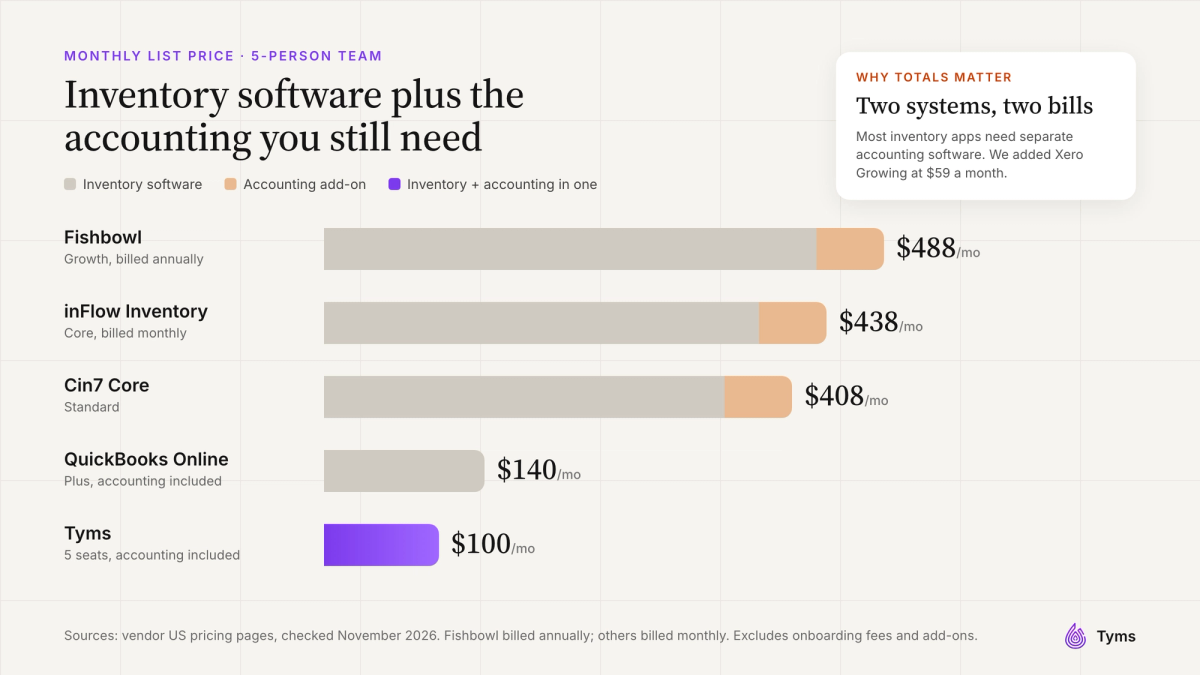
Small business inventory software ranges from free plans with tight limits to several hundred dollars a month. Most dedicated inventory programs don't include accounting, so the real comparison is inventory software plus the accounting software you'll still need. Here's what a 5-person team pays at list price, using Xero Growing at $59 a month[11] as the accounting add-on where it's needed.
| Software | 5-user plan | Inventory price | Accounting included? | Total with accounting |
|---|---|---|---|---|
| Tyms | 5 seats | $100 | Yes | $100 |
| QuickBooks Online | Plus (up to 5 users) | $140 | Yes | $140 |
| Cin7 Core | Standard (5 users) | $349 | No | $408 |
| inFlow Inventory | Core (5 team members), billed monthly | $379 | No | $438 |
| Fishbowl | Growth (5 users), billed annually | $429 | No | $488 |
Hidden costs of inventory software
- Onboarding fees, such as inFlow's required $499 onboarding package on most plans[3].
- Paid add-ons for serial numbers, lot numbers, APIs or extra integrations[3][6].
- Extra users and locations beyond your plan's limits[2].
- First-year discounts that end, such as Sortly's 50% introductory discount[5].
- Barcode scanners and label printers, if you scan at volume.
- A separate accounting subscription, plus the time spent reconciling the two systems, if your inventory software doesn't include accounting.
How to choose the right inventory management software for your business
- E-commerce and multichannel sellers: Zoho Inventory to start, or Cin7 as you scale across marketplaces and wholesale.
- Retail stores: Tyms if you want a point of sale app, barcode scanning, inventory and accounting in one system, or your existing POS's inventory, such as Square for Retail Plus.
- Wholesale and distribution: inFlow, or Fishbowl if you're staying on QuickBooks or Xero.
- Manufacturers and makers: Katana, or Tyms if you want production costs and finished goods in your books automatically.
- Service businesses tracking parts, tools or supplies: Sortly.
- Product businesses that want stock and accounting in one system: Tyms.
Before you commit, take a free trial or demo, import a sample of your real items and run one full cycle: buy, receive, sell and close the month. Check that the COGS and inventory value match what your accountant expects.
How to set up an inventory management system
- Clean up your item list. Remove duplicates, standardize names and give every item a unique SKU.
- Count everything. Do a full physical count on your cutover date.
- Enter opening stock at cost, with quantities and unit costs, so your inventory value is right from day one.
- Choose your costing method (FIFO, LIFO or weighted average) with your accountant, and keep it consistent.
- Set reorder points for your top sellers using the formulas above.
- Connect your sales channels and accounting, or choose software with accounting built in.
- Start cycle counts: count a few items every week instead of everything once a year.
Inventory management best practices
- Use ABC analysis. Focus your attention on the 20% of items that drive most of your sales and profit.
- Count little and often. Weekly cycle counts catch errors early.
- Rotate stock physically so older stock sells first, especially for anything that expires.
- Review slow movers monthly. Discount, bundle or stop reordering items with low sell-through.
- Track supplier lead times and update reorder points when they change.
- Reconcile inventory to your balance sheet every month, or let software that shares one ledger do it for you.
Inventory management system trends for 2027
- AI that records and plans. Instead of only forecasting, AI agents now create items, read supplier documents and record transactions. Tyms' Inventory agent, for example, can read item details from images.
- Inventory and accounting converging. More businesses want stock, COGS and financial statements in one place instead of syncing two systems.
- Unified commerce. Online, in-store and wholesale orders running from one stock pool.
- Inventory in your AI assistant. Tools like Tyms MCP let you ask about stock and sales from Claude, ChatGPT or Perplexity.
Our verdict
The best inventory management software depends on how you sell and how much you need your stock to talk to your books:
- Want inventory, COGS and accounting in one system with AI doing the recording? Choose Tyms.
- Selling online on a budget? Choose Zoho Inventory.
- Wholesale or B2B? Choose inFlow.
- Manufacturing? Choose Katana, or Tyms if you want production costed in your books.
- Just need to track items? Choose Sortly.
- Multichannel brand at scale? Choose Cin7.
- Staying on QuickBooks or Xero? Choose Fishbowl.
Want to see your stock and your profit in one place? Explore Tyms inventory and manufacturing, see Tyms pricing, read our guide to inventory management terms, or get practical inventory tips for retail businesses and for scaling small businesses.
References
- Tyms pricing Tyms, 2026
- Zoho Inventory pricing Zoho, 2026
- inFlow software pricing inFlow Inventory, 2026
- Katana pricing Katana, 2026
- Sortly pricing Sortly, 2026
- Cin7 pricing Cin7, 2026
- Fishbowl pricing Fishbowl, 2026
- Odoo pricing Odoo, 2026
- Square for Retail pricing Square, 2026
- QuickBooks Online plans and pricing Intuit, 2026
- Xero US pricing plans Xero, 2026
Common questions
Inventory management software records every item you buy, make, store and sell, and keeps a live count of your stock. It tracks quantities, costs and movements, values your inventory and tells you when to reorder. Good inventory management software also calculates cost of goods sold so your profit is accurate.
It depends on how you sell. Tyms is best if you want inventory and accounting in one system with AI doing the recording. Zoho Inventory suits online sellers on a budget, inFlow suits wholesalers, Katana suits small manufacturers, Sortly suits simple item tracking and Cin7 suits multichannel brands.
Yes. Zoho Inventory has a free plan for 50 orders a month, Katana is free for up to 30 SKUs, Sortly is free for 100 items, and Odoo offers one app free. Free plans have tight limits on orders, items, users or locations, so check them against your volume.
You can when you have a few items, one location and one sales channel. Spreadsheets break down once several people update stock, you sell in more than one place, or you need accurate cost of goods sold. At that point, inventory management software saves time and prevents costly errors.
They usually mean the same thing. An inventory management system is the process and tools a business uses to track stock, and inventory management software is the program that runs it. A warehouse management system is different: it runs warehouse operations such as bins, picking and shipping.
The four main types are raw materials, work in progress, finished goods, and maintenance, repair and operating (MRO) supplies. Manufacturers track all four. Retailers and wholesalers mostly track finished goods.
A perpetual inventory system updates stock and cost with every purchase and sale, so your numbers are always current. A periodic system only updates after a physical count, usually at month or year end. Inventory management software uses perpetual tracking.
FIFO assumes you sell the oldest stock first and is the most common. LIFO assumes you sell the newest first and isn't allowed in many countries outside the US. Weighted average cost smooths out price changes. Choose with your accountant and use the same method consistently.
Small business inventory software ranges from free plans to several hundred dollars a month. In November 2026, Tyms started at $20 per seat, inFlow at $129 a month, Fishbowl at $229 a month billed annually and Cin7 Core at $349 a month. Remember to add accounting software if your inventory tool doesn't include it.
Not always. Barcode scanning pays off when you receive, pick or count a lot of items, or have many staff handling stock. Smaller businesses with fewer SKUs often manage well with accurate purchase and sales records and regular cycle counts.
When you sell an item, the software takes its cost using your costing method, such as FIFO or weighted average, and records it as cost of goods sold. Inventory software with accounting built in, such as Tyms, posts this to your ledger automatically, so your profit and balance sheet stay accurate.
Inventory planning software forecasts demand and recommends what to buy and when, using sales history, lead times and reorder points. Many inventory management software products include basic planning, while dedicated planning tools add more advanced forecasting.