In this article
- The short answer: the best FreshBooks alternative for each situation
- What FreshBooks does well, and what it costs in 2026
- FreshBooks pros
- FreshBooks cons
- Why people look for a FreshBooks alternative
- 1. The price went up, and the add-ons stack
- 2. Client caps that count archived clients
- 3. Core accounting sits behind higher plans
- 4. You pay for people, not for work
- 5. No inventory, and the bookkeeping is still on you
- Before you switch: do you actually need a FreshBooks alternative?
- FreshBooks alternatives compared at a glance
- How we picked and ranked these alternatives
- The 9 best FreshBooks alternatives for 2027
- 1. Tyms: best for small businesses that want the bookkeeping done for them
- 2. QuickBooks Online: best for full accounting and accountant familiarity
- 3. Xero: best for growing teams
- 4. Zoho Books: best for the lowest bill with real accounting
- 5. Wave: best free option for solo owners
- 6. Bonsai: best for freelancers who need proposals and contracts
- 7. Invoice Ninja: best cheap invoicing with no client cap
- 8. Harvest: best for agencies that bill by the hour
- 9. ZipBooks: best low-cost all-rounder for small teams
- Other FreshBooks alternatives we considered
- Free FreshBooks alternatives
- What each alternative really costs for your team size
- Hidden costs to check before you switch
- How to switch from FreshBooks without losing your history
- For accountants and bookkeepers with FreshBooks clients
- Key features to look for in a FreshBooks alternative
- Our verdict
- References
- Common questions
If you're searching for a FreshBooks alternative, it's usually for one of four reasons: the bill went up, you hit a client cap, your team got bigger, or you need real accounting that FreshBooks keeps on its higher plans. This guide compares the 9 best FreshBooks alternatives for 2027 by the reason you're leaving, with prices checked on each vendor's own pricing page in November 2026.
The short answer: the best FreshBooks alternative for each situation
- Best overall if bookkeeping eats your week: Tyms. Adam, the AI accountant built into Tyms, reconciles your bank, categorizes transactions, sends invoices and builds reports, and you approve the work. $20 per seat a month.[1]
- Best for full accounting and an accountant who already knows it: QuickBooks Online. The broadest feature set and accountant network, from $38 a month.[2]
- Best for growing teams: Xero. No per-user fees on any plan. Growing is $59 a month.[3]
- Best for the lowest bill with real accounting: Zoho Books. A free plan, then $20 a month for Standard and $50 for Professional with 5 users.[4]
- Best free option for solo owners: Wave. Free Starter plan, and Pro is $19 a month per business.[5]
- Best for freelancers who live in proposals and contracts: Bonsai. Essentials is $25 per user a month.[6]
- Best cheap invoicing with no client cap: Invoice Ninja. Pro is $14 a month for unlimited clients.[7]
- Best for agencies that bill by the hour: Harvest. Free for one seat, Teams from $9 per seat a month billed annually.[8]
- Best low-cost all-rounder for small teams: ZipBooks. Free Starter plan, paid plans from $15.[9]
Short on time? If manual bookkeeping is the real problem, start with Tyms. If you only want a smaller bill, look at Zoho Books, Wave or Invoice Ninja. If extra team members are what hurts, look at Xero. If you mostly send proposals and invoices as a freelancer, look at Bonsai.
A note on bias: Tyms publishes this guide, and Tyms is on the list. We say so up front. Every competitor price links to its source, and where another product is the better fit, we say that too.
What FreshBooks does well, and what it costs in 2026
Before looking at FreshBooks alternatives, it's worth being fair to FreshBooks. It's one of the friendliest invoicing tools on the market. Invoices look professional, clients can pay by card, ACH or buy now, pay later, and time tracking, expenses and mileage are included on every plan.[10] Freelancers who send a handful of invoices a month often never need anything more.
The trouble starts as you grow. Here is what FreshBooks lists in the US as of November 2026, before the introductory discount:
| Plan | List price | Billable clients | Not included on this plan |
|---|---|---|---|
| Lite | $23 a month | 5 | Bank reconciliation, double-entry reports, accountant access, receipt capture, proposals |
| Plus | $43 a month | 50 | Accounts payable, project profitability, bill receipt capture |
| Premium | $70 a month | Unlimited | Removing FreshBooks branding from client emails |
| Select | Custom quote | Unlimited | Nothing major; includes 2 team members |
| Add-ons | Team members $11 a month each; Advanced Payments $20 a month; Payroll $40 a month plus $6 per user |
FreshBooks pros
- Invoicing that clients like. Clean invoices, online payments, deposits, late fees and automatic reminders on every plan.
- Time and expense tracking included. Unlimited time tracking, unlimited expenses and mobile mileage tracking on every plan.[10]
- Easy to learn. Most owners are sending invoices on day one.
FreshBooks cons
- Client caps. 5 billable clients on Lite and 50 on Plus, and archived clients still count.[11]
- Per-person pricing. Every extra team member is $11 a month.[10]
- Accounting gated by plan. Bank reconciliation and accountant access start on Plus. Accounts payable starts on Premium.
- No inventory. FreshBooks doesn't list inventory tracking or purchase orders on any plan.
Why people look for a FreshBooks alternative
1. The price went up, and the add-ons stack
FreshBooks raised list prices on every plan. In June 2025, Lite was $21, Plus $38 and Premium $65 a month.[12] By November 2026 they were $23, $43 and $70.[10] That's a 13% rise on Plus, the most popular plan.
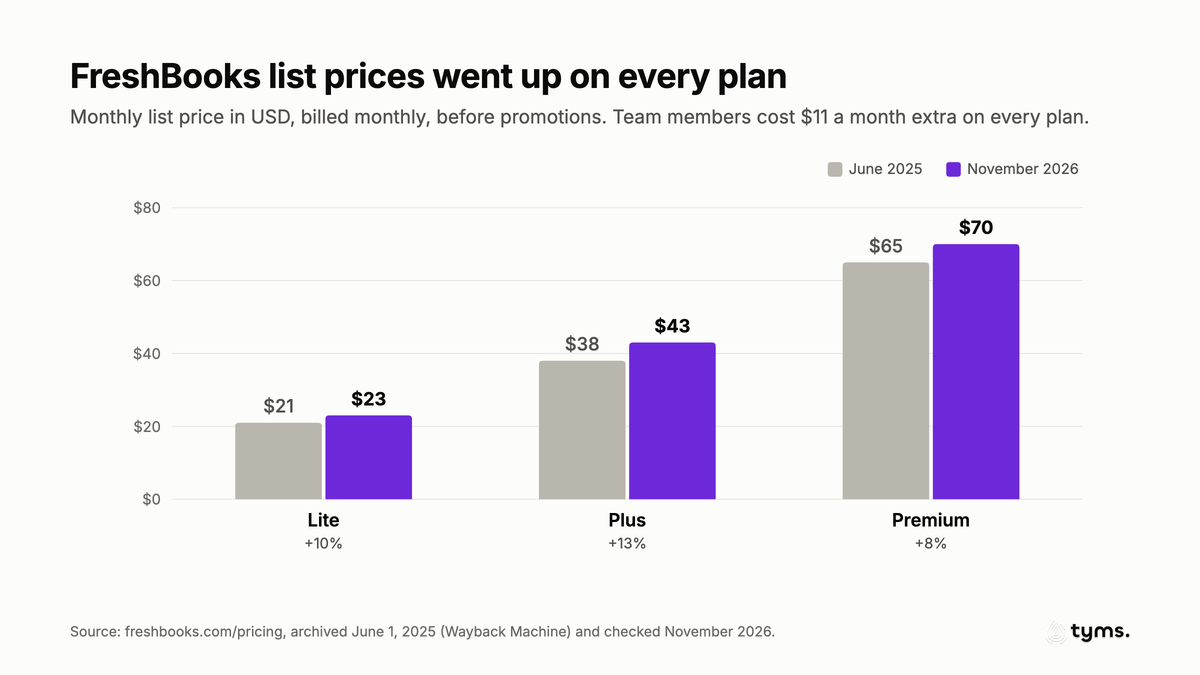
The sticker price is only part of it. Advanced Payments is $20 a month, payroll is $40 a month plus $6 per user, and team members are $11 each.[10] The introductory discount (80% off for four months when we checked) makes month one look cheap, and the renewal makes month five look expensive.
2. Client caps that count archived clients
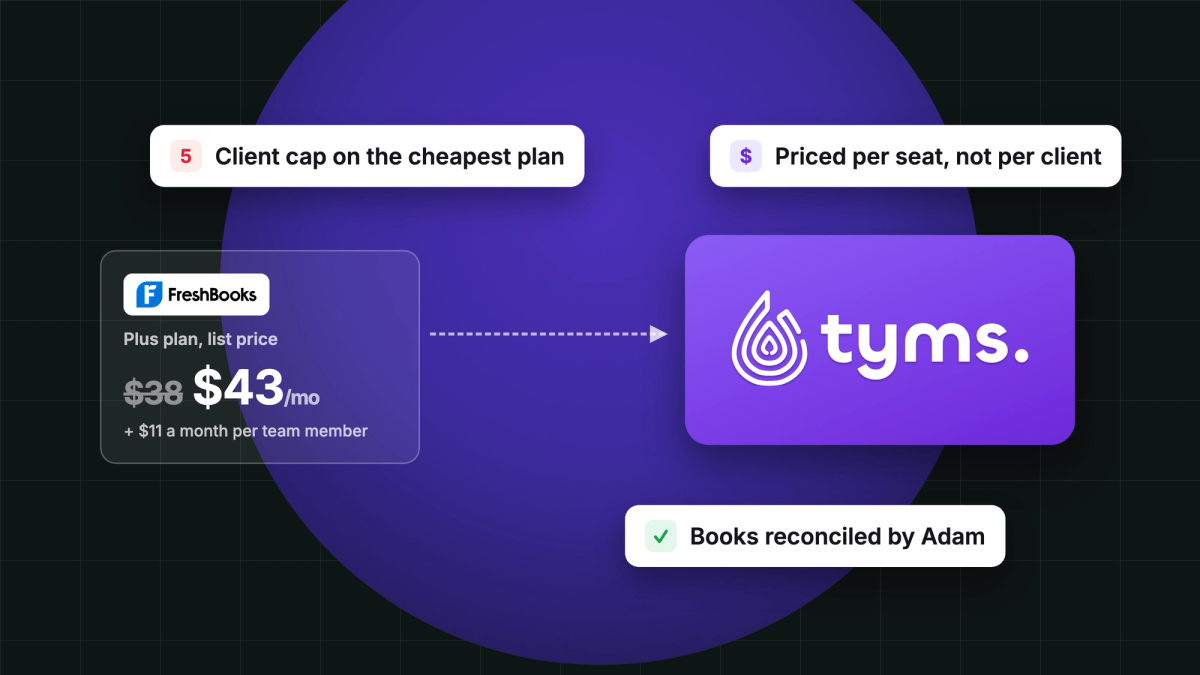
Lite lets you bill 5 clients and Plus lets you bill 50.[10] The detail that catches people out: FreshBooks counts both active and archived clients toward that limit. Only deleted clients free up a slot.[11] So a freelancer with 4 regular clients and 2 old ones is already over the Lite limit, and the fix is either deleting history from view or paying $20 more a month for Plus.
3. Core accounting sits behind higher plans
On Lite, FreshBooks doesn't include bank reconciliation, double-entry accounting reports, accountant access or automatic receipt capture. Accounts payable (tracking the bills you owe) is only on Premium and Select.[10] If your accountant needs a reconciled ledger at tax time, you're paying $43 or $70 a month to get it.
4. You pay for people, not for work
Every FreshBooks plan charges $11 a month for each extra team member.[10] A 5-person team on Plus pays $87 a month, and a 10-person team pays $142. Some alternatives on this list charge nothing extra for users at all.
5. No inventory, and the bookkeeping is still on you
FreshBooks is built around services. If you sell products, it has no inventory tracking or purchase orders on its pricing page. And even on Premium, FreshBooks gives you the tools to keep your books. It doesn't keep them for you. Someone still has to categorize transactions, match payments and close the month.
Before you switch: do you actually need a FreshBooks alternative?
Switching has a cost, so check whether FreshBooks is really the problem.
- If you're a solo freelancer with under 5 active clients, Lite may still be the cheapest polished option. Delete (not archive) old clients to stay under the cap.
- If your only complaint is the renewal price, ask FreshBooks support about annual billing, which was an extra 10% off when we checked.[10]
- If your accountant does your reconciliation anyway, the missing features on Lite may not matter to you.
But if you need reconciliation without paying for Plus, you're adding team members, you sell products, or the monthly close is still taking your evenings, a FreshBooks alternative will save you money or time, and often both.
FreshBooks alternatives compared at a glance
| Software | Best for | Starting price | Users | Client limit | Bank reconciliation |
|---|---|---|---|---|---|
| Tyms | Small businesses that want an AI accountant to do the bookkeeping | $20 per seat a month | Per seat | No client cap listed | Yes, done by Adam |
| QuickBooks Online | Full accounting with a large accountant network | Free (2 invoices a month); Simple Start $38 | 1 to 25 by plan | No | Yes |
| Xero | Growing teams | $27 a month (Early, 20 invoices) | No per-user fees | No | Yes |
| Zoho Books | The lowest bill with real accounting | Free; Standard $20 | 1 to 15 by plan | No | Yes |
| Wave | Solo owners on a tight budget | Free; Pro $19 per business | Collaborators on Pro | No | Yes |
| Bonsai | Freelancers who need proposals and contracts | $25 per user (Essentials) | Per user | Unlimited clients | No, it's not accounting software |
| Invoice Ninja | Cheap invoicing with no client cap | Free (5 clients); Pro $14 | Enterprise from $18 for 1 to 2 users | Unlimited on Pro | No |
| Harvest | Agencies that bill by the hour | Free (1 seat); Teams from $9 per seat, billed annually | Per seat | Usage-based | No |
| ZipBooks | Low-cost all-rounder for small teams | Free; Smarter $15 | 5 team members on Smarter | No | On Sophisticated ($35) |
| FreshBooks (for reference) | Freelancers who mostly invoice | $23 a month (Lite) | $11 per extra team member | 5 on Lite, 50 on Plus | Plus and up |
How we picked and ranked these alternatives
We started from the top 10 Google results for "FreshBooks alternative" and "best FreshBooks alternatives," listed every product those guides recommend, and kept the ones a typical FreshBooks customer could actually move to: freelancers, service businesses and small teams in the US. Then we scored each one on five things that matter when you leave FreshBooks:
- Accounting depth. Double-entry books, reconciliation, accounts payable and reports your accountant will accept.
- Invoicing and getting paid. Invoices, recurring billing, online payments, reminders and client limits.
- Automation. How much of the bookkeeping the software does without you.
- Value as you grow. Monthly cost for 1, 5 and 10 people.
- Ease of switching. Imports, exports and whether you can leave again later.
Prices come from each vendor's own pricing page, checked in November 2026. We didn't use affiliate links, and no vendor paid to be included.
| Software | Accounting depth | Invoicing | Automation | Value as you grow | Overall |
|---|---|---|---|---|---|
| Tyms | 5 | 4 | 5 | 4 | 4.6 |
| QuickBooks Online | 5 | 4 | 4 | 2 | 4.0 |
| Xero | 4 | 4 | 3 | 5 | 4.0 |
| Zoho Books | 4 | 4 | 3 | 5 | 4.0 |
| Wave | 3 | 4 | 2 | 5 | 3.5 |
| Bonsai | 1 | 5 | 2 | 3 | 2.8 |
| Invoice Ninja | 1 | 4 | 2 | 4 | 2.8 |
| Harvest | 1 | 4 | 2 | 3 | 2.5 |
| ZipBooks | 3 | 3 | 2 | 4 | 3.0 |
The 9 best FreshBooks alternatives for 2027
1. Tyms: best for small businesses that want the bookkeeping done for them
Tyms is accounting software with an AI accountant, Adam, built in. Every other FreshBooks alternative here gives you better tools to do the bookkeeping. Tyms is built so Adam does the bookkeeping and you review it. You talk to your books in plain English, such as "reconcile October," "invoice Acme for the March retainer" or "why is profit down this quarter?", and Adam works from your real ledger.
Who it's for: service businesses, agencies, product sellers and small teams that have outgrown invoicing software and don't want to hire a bookkeeper yet. It's also built for accounting firms that run many clients.
Pricing: $20 per seat a month.[1] Each seat includes one team member, 1,500 transactions a month and 5 bank connections. If you'd rather hand the books over entirely, Done for you adds Tyms' in-house experts for your bookkeeping, monthly close and tax filing, priced per 500 entries a month.[1]
What it does better than FreshBooks:
- Reconciliation on every plan. Bank feeds through Plaid and Stripe, or statement uploads, and Adam categorizes and reconciles the transactions. You approve the work in bulk.
- Agents that run on a schedule. Eight specialist agents cover banking, invoicing, bills, inventory, contacts, the chart of accounts, fixed assets and financial statements. Schedule them weekly, or run them on demand.
- Invoices and reminders without the client cap. Invoices, recurring invoices, quotes that convert to invoices, automatic reminders and customer statements. Tyms prices by seat, not by how many clients you bill.
- Inventory when you need it. Items, bundles, purchase orders with approvals, production orders and stock adjustments.
- US tax-ready. Tyms builds a filled Schedule C from your books and maps your chart of accounts to tax lines.
- Controls for teams. Custom roles, approval workflows, a full audit log and two-factor sign-in. Tyms is ISO 27001 and SOC 2 Type 2 certified.[1]
- Your books in your AI tools. You can use your Tyms books inside Claude and ChatGPT through Tyms MCP.
Drawbacks:
- There's no one-click FreshBooks import. Tyms' migration partner moves QuickBooks, Xero, Zoho Books and Sage files.[13] From FreshBooks, you export CSVs and bring them in with the Tyms spreadsheet importer, which is on paid plans.
- More than a solo freelancer needs. If you send five invoices a month and your accountant reconciles once a year, FreshBooks Lite or Invoice Ninja costs less.
For a head-to-head view, see our Tyms vs FreshBooks comparison.
2. QuickBooks Online: best for full accounting and accountant familiarity
QuickBooks Online is the accounting software most US accountants already use, which is its biggest advantage. If your CPA asks you to switch, this is usually what they mean.
Who it's for: businesses that need full double-entry accounting, inventory on higher plans, and an accountant who wants to log in and work.
Pricing: a new Free plan with 1 user, 2 invoices a month and 1 bank connection. Simple Start is $38 a month for 1 user, Essentials $85 for 3 users, Plus $140 for 5 users and Advanced $340 for 25 users.[2]
What it does better than FreshBooks:
- Deeper accounting. Bills, inventory (Plus and up), classes and locations, budgets and project profitability.
- Accountant access on every paid plan. Two accountant seats from Simple Start.
- The biggest app and accountant ecosystem in US small-business accounting.
Drawbacks:
- Expensive as you grow. A 5-person team needs Plus at $140 a month.
- Users are capped by plan. Adding a fourth user means moving from Essentials to Plus.
- The bookkeeping is still mostly yours, even with Intuit's AI features, many of which are listed as beta.
If QuickBooks' price is what's pushing you away, our QuickBooks alternatives guide covers that side.
3. Xero: best for growing teams
Xero's headline is simple: no per-user license fees.[3] For a team paying FreshBooks $11 a head, that alone can cut the bill.
Who it's for: small and growing businesses with several people in the books, and owners who work closely with an accountant.
Pricing: Early is $27 a month with 20 invoices and 5 bills. Growing is $59 a month with unlimited invoices and bills. Established is $97 a month and adds multi-currency, projects and expense claims.[3]
What it does better than FreshBooks:
- Unlimited users on every plan.
- Strong reconciliation and cash flow forecasting (30 to 180 days by plan).
- Real bills and payables from Growing up, with free ACH bill pay in the US.
Drawbacks:
- Early caps you at 20 invoices, so most service businesses need Growing.
- Auto-reconcile is a $5 add-on on Early.[3]
- Payroll costs extra: $36 a month plus $6 per person through Gusto.
See how Xero compares with Tyms in Tyms vs Xero.
4. Zoho Books: best for the lowest bill with real accounting
Zoho Books gives you proper double-entry accounting for less than FreshBooks charges for invoicing.
Who it's for: budget-minded small businesses, especially those already using Zoho CRM or other Zoho apps.
Pricing: Free for 1 user plus 1 accountant. Standard is $20 a month (3 users), Professional $50 (5 users), Premium $70 (10 users), Elite $150 (10 users) and Ultimate $275 (15 users).[4][14] Extra users are $2.50 a month each, billed annually.
What it does better than FreshBooks:
- Users included in the price. Five people on Professional cost $50, not $87.
- Inventory and purchases from Professional up.
- A genuinely free tier for very small businesses.
Drawbacks:
- Lots of settings, which can feel heavy if you're coming from FreshBooks.
- Best inside the Zoho world. Integrations outside Zoho are thinner.
Read Tyms vs Zoho Books if you're weighing the two.
5. Wave: best free option for solo owners
Wave is the most common free FreshBooks alternative, and it's a fair one for sole proprietors.
Who it's for: freelancers and micro-businesses who want free invoicing and basic bookkeeping.
Pricing: Starter is free. Pro is $19 a month or $190 a year, per business, and adds automatic bank imports, more automation and a waived 60-cent fee on your first 10 card payments each month. Wave Advisors, which adds a human bookkeeper, starts at $149 a month.[5]
What it does better than FreshBooks:
- No client limits and a free plan.
- Priced per business, not per person.
Drawbacks:
- Payment fees on Starter are 2.9% plus 60 cents per card transaction.[5]
- Built for very small businesses. Teams that need approvals, deeper reports or several people working in the books usually outgrow it.
6. Bonsai: best for freelancers who need proposals and contracts
Bonsai is the alternative for people who liked FreshBooks for its client workflow, not its accounting. It bundles proposals, contracts, e-signatures, scheduling, a client portal and invoicing.
Who it's for: freelancers, consultants and small agencies.
Pricing: Basic is $15 per user a month but doesn't include invoicing. Essentials, the first plan with invoices and payments, is $25 per user a month ($19 billed annually). Premium is $39 and Elite $59 per user a month, with a 3-user minimum on Elite.[6]
What it does better than FreshBooks:
- Proposals and contracts in one flow with invoicing.
- Unlimited clients on every plan.
Drawbacks:
- It isn't accounting software. You'll still need books and reconciliation somewhere else. Bonsai integrates with QuickBooks and Xero from Premium.[6]
- Per-user pricing adds up for teams.
7. Invoice Ninja: best cheap invoicing with no client cap
Invoice Ninja is a straightforward fix for FreshBooks' client caps. It's also open source, so you can host it yourself.
Who it's for: freelancers and small businesses who mainly need invoices, quotes and online payments.
Pricing: Free for up to 5 clients. Pro is $14 a month ($140 a year) for unlimited clients. Enterprise starts at $18 a month for 1 to 2 users.[7]
What it does better than FreshBooks:
- Unlimited clients for $14. That's $29 a month less than FreshBooks Plus.
- Works with many payment gateways, including Stripe, PayPal, Square and GoCardless.
Drawbacks:
- No full accounting. Pair it with books elsewhere.
- Fewer built-in reports than accounting software.
8. Harvest: best for agencies that bill by the hour
If FreshBooks time tracking was the feature you used most, Harvest does that job better, with team timesheets, budgets and invoicing from tracked hours.
Who it's for: agencies, studios and consultancies that bill by the hour.
Pricing: Free for 1 seat and 2 projects. Teams starts at $9 per seat a month and Enterprise at $14, both billed annually. Harvest now adds usage-based charges for extra invoices, projects, clients and tasks as you grow.[8]
What it does better than FreshBooks:
- Better time and budget reporting for teams.
- Timesheet approvals on Enterprise.
Drawbacks:
- Not accounting software. It connects to accounting tools instead.
- Usage-based fees make the bill harder to predict.
9. ZipBooks: best low-cost all-rounder for small teams
ZipBooks shows up on most FreshBooks alternatives lists because it covers invoicing and bookkeeping at a low price.
Who it's for: small teams that want invoicing plus light bookkeeping without a big bill.
Pricing: Starter is free with unlimited invoices. Smarter is $15 and adds recurring invoices, reminders, time tracking and 5 team members. Sophisticated is $35 and adds reconciliation and unlimited users.[9]
What it does better than FreshBooks:
- Unlimited users on Sophisticated.
- A free plan with unlimited invoices.
Drawbacks:
- Reconciliation only on the top plan.
- A smaller company and ecosystem than the market leaders.
Other FreshBooks alternatives we considered
HoneyBook suits creative businesses that want booking and contracts in one place. Sage 50 suits desktop users with heavier inventory needs. NetSuite is an ERP for much larger companies. We didn't rank them because they serve different buyers than most FreshBooks customers.
Free FreshBooks alternatives
FreshBooks has a 30-day free trial but no free plan.[10] If your budget is zero, these are the realistic options:
- Wave Starter: free invoicing and bookkeeping, with card fees of 2.9% plus 60 cents.[5]
- Zoho Books Free: free accounting for 1 user plus your accountant.[14]
- QuickBooks Online Free: 1 user, 2 invoices a month and 1 bank connection.[2]
- Invoice Ninja Free: unlimited invoices for up to 5 clients.[7]
- ZipBooks Starter: unlimited invoices and 1 bank account.[9]
- Harvest Free: 1 seat and 2 projects with time tracking and invoicing.[8]
Free plans are fine for getting started. Watch the payment processing fees, because on a free plan that's how the vendor makes money.
What each alternative really costs for your team size
FreshBooks looks cheap for one person and gets expensive per head. The right FreshBooks alternative depends on how many people need access.
| Software | 1 user | 5 users | 10 users |
|---|---|---|---|
| FreshBooks | $23 (Lite, 5 clients) or $43 (Plus) | $87 (Plus + 4 team members) | $142 (Plus + 9 team members) |
| Tyms | $20 | $100 | $200 |
| QuickBooks Online | $38 (Simple Start) | $140 (Plus) | $340 (Advanced) |
| Xero | $27 (Early) or $59 (Growing) | $59 (Growing) | $59 (Growing) |
| Zoho Books | Free or $20 (Standard) | $50 (Professional) | $70 (Premium) |
| Wave | Free or $19 (Pro) | $19 (Pro, per business) | $19 (Pro, per business) |
| Bonsai Essentials | $25 | $125 | $250 |
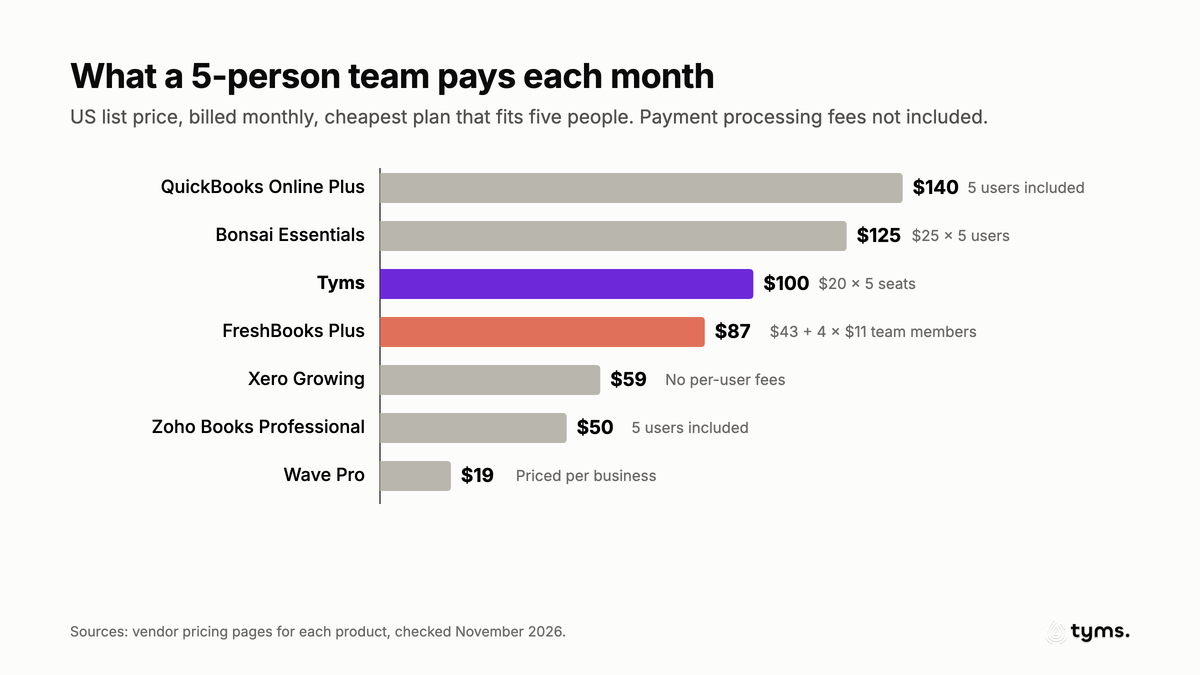
Two honest takeaways. First, if price is your only concern, Xero, Zoho Books and Wave beat FreshBooks for teams. Second, Tyms costs a little more than FreshBooks Plus for five people, and the difference is what you're paying for: Adam does the reconciliation, categorization and month-end reports that FreshBooks leaves to you or to a bookkeeper. Compare that with Wave Advisors at $149 a month or a part-time bookkeeper, not with an invoicing app.
Hidden costs to check before you switch
The subscription is rarely the whole bill. Check these on any FreshBooks alternative:
- Payment processing. FreshBooks charges 2.9% plus 30 cents per card payment and 1% for ACH.[10] Wave Starter charges 2.9% plus 60 cents.[5] On $10,000 a month of card payments, that's roughly $290 or more in fees, which is more than most plans on this list cost.
- Invoice and bill caps. QuickBooks Free allows 2 invoices a month.[2] Xero Early allows 20 invoices and 5 bills.[3]
- Per-user and per-client limits. FreshBooks charges per team member and caps clients. QuickBooks caps users per plan. Bonsai charges per user.
- Add-ons. Payroll is extra almost everywhere: FreshBooks and Wave from $40 a month, Xero $36 a month plus $6 per person.
- Usage-based charges. Harvest bills extra invoices, projects, clients and tasks on top of seats.[8]
- Introductory pricing. FreshBooks, Xero and QuickBooks all lead with big first-months discounts. Budget for the list price.
How to switch from FreshBooks without losing your history
FreshBooks lets you export most of your data yourself, so you're not locked in. Here's a safe order:
- Pick your switch date. The start of a month or quarter makes reconciliation cleaner.
- Export everything from FreshBooks. Clients (active and archived), invoices, expenses and receipt images, items and services, vendors, the chart of accounts and reports all export as CSV or PDF.[15] Estimates and proposals export as PDFs, and FreshBooks support will email a CSV on request.
- Run your final reports. Save a profit and loss, balance sheet and accounts receivable aging as of your switch date.
- Set up the new system. Import clients, vendors and items first, then open invoices and opening balances.
- Reconnect your bank and payment processor, and run both systems side by side for a few weeks.
- Cancel FreshBooks at renewal, once every export is saved and your first month in the new system reconciles.
With Tyms, the spreadsheet importer reads CSV, XLS and XLSX files and suggests how to map the columns. You can also forward receipts and invoices to your Tyms inbox and Adam records them. Once your bank is connected, Adam categorizes the new transactions from day one.
For accountants and bookkeepers with FreshBooks clients
If you manage several FreshBooks clients, the per-client plan limits and $11 team member fees multiply across your book of business. Look for:
- One login for every client, with staff assignments and access you can revoke.
- Bulk work across clients, not one file at a time.
- A way to bill your clients from the same place.
Tyms for accounting firms includes a client portfolio, a white-label client portal on your own domain, client billing through Stripe Connect and a shared pool of seats you buy wholesale and hand out to clients. Adam handles the routine bookkeeping on each client's books, and your team reviews it. See the best accounting software for CPA firms for the full comparison.
Key features to look for in a FreshBooks alternative
Whatever you choose, make sure the new tool covers these:
- Bank feeds and reconciliation on the plan you'll actually buy, not just the top tier.
- Double-entry reports your accountant accepts: profit and loss, balance sheet, cash flow and trial balance.
- Accounts payable, so bills and vendor payments live next to your invoices.
- No surprise caps on clients, invoices or users.
- Online payments with fees you've checked.
- Exports in standard formats, so you can leave later.
- Automation that does work, not just stores it. Bank rules help, but an AI accountant that reconciles and closes the month changes how much time the books take. Read how automated bank rules and reconciliation work in Tyms.
Our verdict
There isn't one best FreshBooks alternative for everyone. There is a best one for your reason for leaving.
- If the bookkeeping is what eats your time, choose Tyms. It's the only option here where an AI accountant does the reconciliation, categorization and reporting for you.
- If you need the most complete accounting and your accountant uses it, choose QuickBooks Online.
- If team member fees are the problem, choose Xero for unlimited users, or Zoho Books for the lowest bill.
- If you're solo and want free, choose Wave.
- If you want FreshBooks-style client workflow, choose Bonsai, or Invoice Ninja if you only need cheap, unlimited invoicing.
If you want to see what an AI accountant does with your own numbers, compare Tyms plans and connect your bank. You can keep FreshBooks running while you try it.
References
- Tyms pricing Tyms, 2026
- QuickBooks Online plans and pricing Intuit, 2026
- Xero US pricing plans Xero, 2026
- Zoho Books pricing (United States) Zoho, 2026
- Wave pricing Wave Financial, 2026
- Bonsai pricing Bonsai, 2026
- Invoice Ninja pricing Invoice Ninja, 2026
- Harvest pricing Harvest, 2026
- ZipBooks pricing ZipBooks, 2026
- FreshBooks pricing FreshBooks, 2026
- How does archive or delete work? FreshBooks Support, 2026
- FreshBooks pricing (archived June 1, 2025) FreshBooks via the Internet Archive, 2025
- Migrate to Tyms Tyms, 2026
- Zoho Books plan comparison (United States) Zoho, 2026
- How do I export my data? FreshBooks Support, 2026
Common questions
It depends on why you're leaving. If manual bookkeeping is the problem, Tyms is the best fit because its AI accountant, Adam, reconciles, categorizes and reports for you. If you want the most complete accounting, choose QuickBooks Online. If team member fees hurt, Xero has no per-user fees and Zoho Books includes users in the price. Wave is the best free option for solo owners.
As of November 2026, FreshBooks lists Lite at $23 a month for 5 billable clients, Plus at $43 for 50 clients and Premium at $70 for unlimited clients, billed monthly before introductory discounts. Each extra team member is $11 a month, Advanced Payments is $20 a month and payroll is $40 a month plus $6 per user.
Yes. In June 2025 FreshBooks listed Lite at $21, Plus at $38 and Premium at $65 a month. By November 2026 the list prices were $23, $43 and $70. That's a 13% increase on Plus, the most popular plan.
Yes. Wave Starter, Zoho Books Free, QuickBooks Online Free, Invoice Ninja Free, ZipBooks Starter and Harvest Free all have no monthly fee. Each has limits, such as 2 invoices a month on QuickBooks Free, 5 clients on Invoice Ninja Free and 1 user on Zoho Books Free, and most make money from payment processing fees.
Yes. FreshBooks counts both active and archived clients toward the 5-client limit on Lite and the 50-client limit on Plus. Only deleted clients free up a slot, and their past invoices stay accessible.
Wave is better if you're a solo owner who wants free invoicing and bookkeeping with no client limits. FreshBooks is better if you want polished client workflows like proposals, retainers and time tracking. Growing teams usually outgrow both and move to Xero, Zoho Books, QuickBooks Online or Tyms.
QuickBooks Online has deeper accounting, including bills, inventory on Plus and up, budgets and accountant access on every paid plan. FreshBooks is simpler and better for invoicing-led service businesses. QuickBooks costs more as you grow: a 5-person team needs Plus at $140 a month, compared with $87 on FreshBooks Plus with 4 extra team members.
Xero has no per-user license fees on any plan, so a 10-person team pays the same $59 a month on Growing as a 1-person team. Wave Pro is priced per business at $19 a month. Zoho Books includes 3 to 15 users depending on the plan.
Yes. FreshBooks lets you export clients, invoices, expenses, items and services, vendors, the chart of accounts and reports as CSV files. Estimates and proposals export as PDFs, or as a CSV on request from FreshBooks support. Export before you cancel, then import clients, vendors and open invoices into the new system first.
Yes. Tyms has an AI accountant, Adam, built in. Adam syncs your bank, categorizes and reconciles transactions, creates and sends invoices, records bills and builds financial statements, and you approve the work. Tyms is $20 per seat a month, and its Done for you plan adds in-house experts for your books and taxes.